Help! Sublinks no longer showing in header

Hi, recently the header sublinks on my site began to no longer appear when a user mouses over them (submenu should appear), nor does my header remain sticky:

It appears this broke during one of the theme updates? Seems to only affect Chrome. You can see it live at https://www.quantifiedbob.com . I have disabled all caching for the time being.

Thanks in advance for your help!!

Hi @quantifiedbobby,

Thanks for writing in.

I could see a lot of errors in browser console. First, increase your memory allocation.

To increase it, please edit your wp-config.php file and insert these lines:

define( 'WP_MEMORY_LIMIT', '256M' );
define( 'WP_MAX_MEMORY_LIMIT', '512M' );

You can add it before the line
/*That's all, stop editing! Happy Blogging. */

Next, check for plugin conflicts, You can do this by deactivating all third party plugins, and seeing if the problem remains. If it’s fixed, you’ll know a plugin caused the problem, and you can narrow down which one by reactivating them one at a time.

Let us know how it goes!

Thanks

Hi @nico,

Thanks for the advice. I updated my wp-config.php file per your suggestion and disabled all plugins but the issue still exists when using Chrome. Which browser errors in particular? When I do validation, I see some html browser errors, but those seem to be related to the Pro theme (several improper elements that begin with “x-…”).

However, this seems to only be an issue when using Chrome on Mac OSX (works fine on iPhone, iPad, etc.). When I use the document inspector I do see that the dropdowns/sublinks are generating on mouseover, but they are not displaying:
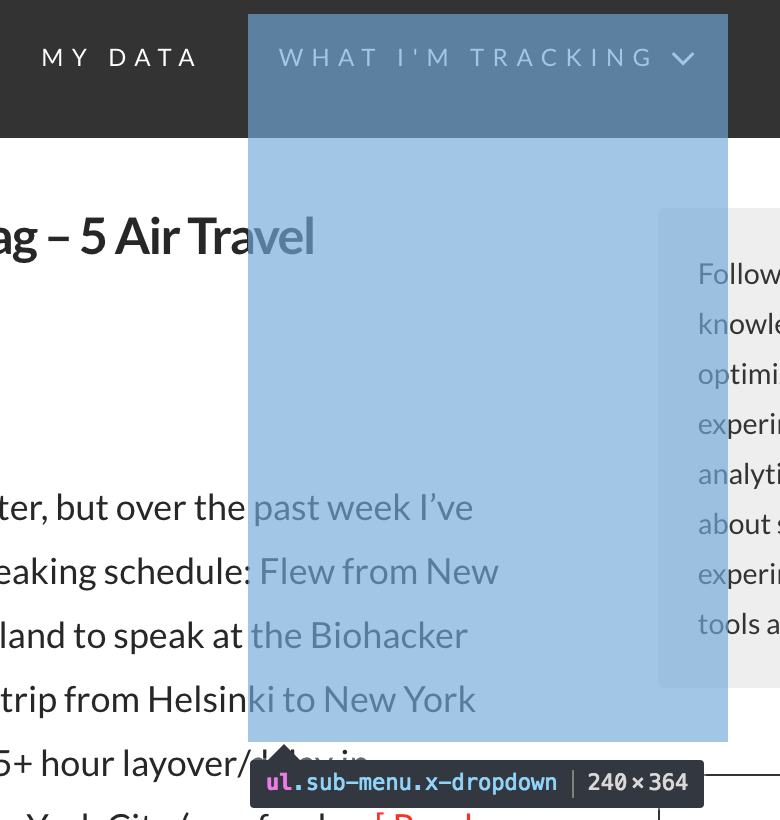
Any ideas what could be causing the issue? Looking further, it seems like data-x-bar is not respecting parameters being passed to it such as sticky:

data-x-bar="{“id”:“hm1”,“region”:“top”,“height”:“5em”,“sticky”:true,“triggerOffset”:“0”,“shrink”:“1”}"

Were any recent changes made to the 1.2x themes? Is there some updated javascript I need? I am using a child theme.

Thanks!

Hey @quantifiedbobby,

It looks like malformed code is causing this or customization if you have any. Please check for the following also:

  1. If you’re using a CDN, please clear the CDN’s cache and disable optimization services.

  2. Remove custom CSS, Javascript and templates.

If nothing helps, please give us WP Admin and cPanel access in a Secure Note. It would be best you keep all third party plugins and customizations turned off while we investigate to speed things up.

Thanks.

Hi @christian_y,

Ok, looks like the issue is resolved. Updating to the latest version of Pro and disabling Cloudflare’s RocketLoader seemed to do the trick. Thanks.

Hey There,

We are just glad that you have found out that it is CloudFlare’s RocketLoader is causing the issue.
Thanks for letting us know!

Best Regards.

This topic was automatically closed 10 days after the last reply. New replies are no longer allowed.