Headline Not Centered on Mobile - Fine in Cornerstone View

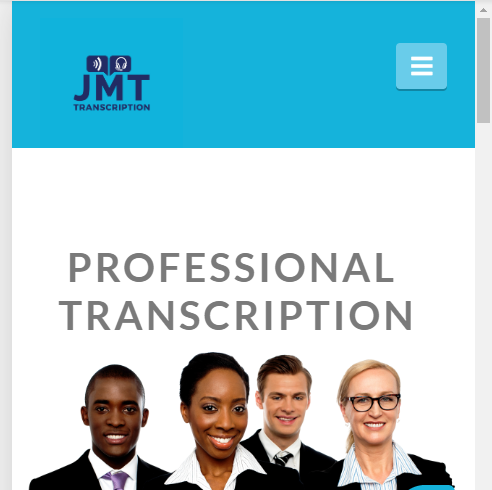
Hi. I’m having a heck of a time getting the headline to center on mobile on a couple of my pages. The first screenshot is how it actually looks on a mobile device, and the second one how it looks in Cornerstone (which is how it should look). I’ve been through so many threads on here and just can’t seem to correct it. Settings seem to be the same as on the pages that are working correctly. Please help!

Hey Nicole,

The text is actually centered. But because the size of the text is big, it gets cut-off in very small screens. If you make the text smaller in mobile, you will see that it will be centered like the screenshot below.

There are 2 methods to achieve Responsive Text in Cornerstone. Please can see the 2 methods in the video tutorial below.

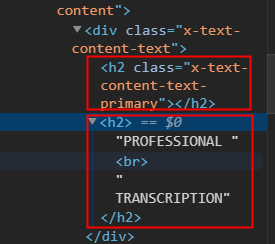
You’re also using a Headline element but you inserted h2 tags to inside so it produces an empty h2 tag.

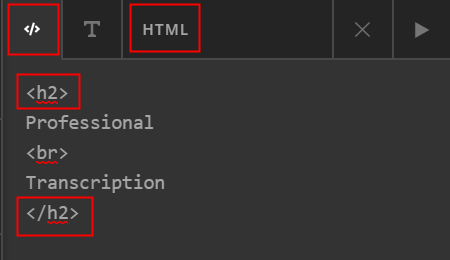
You’re Headline setup most probably looks like this:

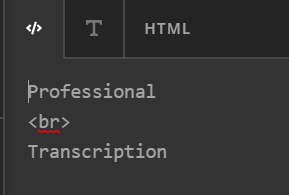
Please remove the h2 tags like this:

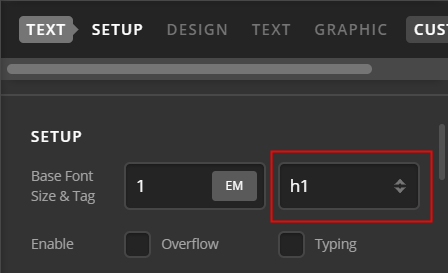
In the Headline Text Setup, you will see that there’s a Tag setting. That will wrap the text with the chosen tag so there’s no need to insert tags in the text editor.

Hope that helps.

That did it. Thanks so much!!!

Glad we could help.

Cheers!

This topic was automatically closed 10 days after the last reply. New replies are no longer allowed.