Headline in same line

Hi!

I found a trouble when I added a headline in my page http://talentch-cp5003.wordpresstemporal.com/sobre-nosotros/ (the last one: ‘¿QUÉ DICEN LOS MEDIOS SOBRE NOSOTROS?’). I want to these words will be on the same line of text, as it appears in the home page with the headline ‘ESTAS MARCAS YA CONFIARON EN NOSOTROS’.

I checked the characteristics in these columns, rows and elements and all of them are the same ones (the width, align, etc.). How can I fix it?

Thank you so much.
Hi Jorge,

Thanks for reaching out.

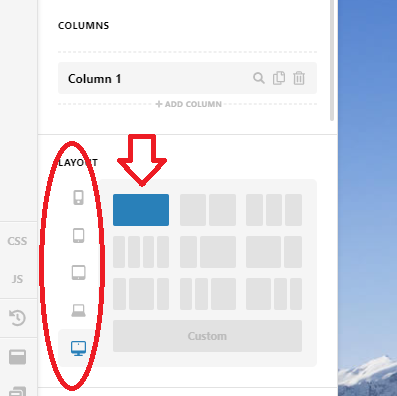
There is just one column item, but it seems the row is configured to two columns and not one. Please make sure all devices are set to one column under the row setting.

Hope this helps.

Thanks!

Hi @Rad.

I tried this but it doesn’t work yet.

I don’t know why!

Hi Jorge,

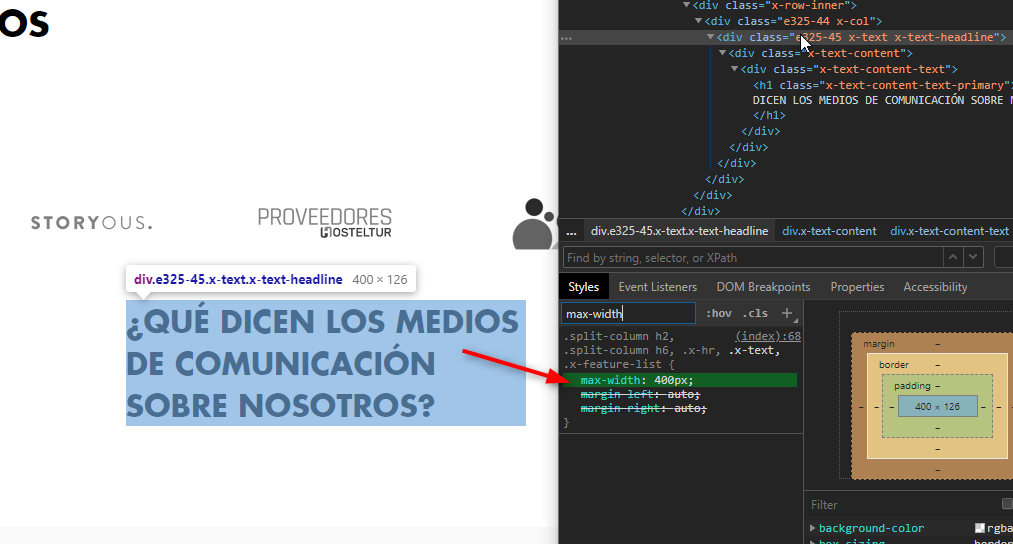
There is a max-width: 400px applied to that headline element.

Please look for that custom CSS below on your Page > CSS or Theme Options > CSS and remove the .x-text selector.

.split-column h2, .split-column h6, .x-hr, .x-text, .x-feature-list {
    max-width: 400px;
    margin-left: auto;
    margin-right: auto;
}

Hope it helps,
Cheers!

Hi @friech!

This worked! Thank you so much.

Kind regards :slight_smile:

We are delighted to assist you with this.

Cheers!

This topic was automatically closed 10 days after the last reply. New replies are no longer allowed.