Heading H2 color is not changing

Hi all,

I need help with my blog posts for example here: https://www.ruhglobal.com/digital-inclusion-for-rural-communities/

The H2 headings are using this color #ff551d I have changed everywhere where I thought that color could be set but I just can’t find a way to actually change them.

Thanks in advance for all your help.

Best,
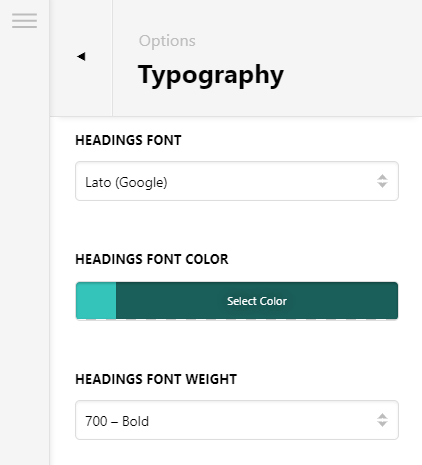
Hi @RuhGlobalCommunicati,

Thank you for reaching out to us. You can change the headings font color via Theme Options > Typography > Headings

However upon checking your blog post It seems like you’re using Elementor page builder which could be overriding the font color of your headings.

Also check if you have custom CSS added in Theme Options > CSS and look out for the following code:

h1 strong, h2 strong, h3 strong, h4 strong, h5 strong, h6 strong {
    font-weight: inherit;
    color: #ff551d;
}

You can either remove it or change it as you need. Hope this helps!

1 Like

Thanks, it was in additional CSS. Although I do not remember ever adding it there.

You’re welcome!
We’re glad @Nabeel were able to help you out.

This topic was automatically closed 10 days after the last reply. New replies are no longer allowed.