How do you change the size of the headers (mine are huge) without making the body text smaller.
How do you decrease the distance between the paragraphs?
Thanks
How do you change the size of the headers (mine are huge) without making the body text smaller.
How do you decrease the distance between the paragraphs?
Thanks
Hi There,
Thanks for writing in!
Can you please clarify if your page content is build with content builder/cornerstone or those are just build with WordPress default editor?
There is two option to manage the font size for the heading and body text. The easy option is using CSS.
You can add custom CSS to headline tags.
Example:
h1 {
font-size: 30px;
}
h2 {
font-size: 20px;
}
h3 {
font-size: 18px;
}
h4 {
font-size: 14px;
}
You can add this CSS to your Theme Option -> CSS. You can change the value of your choice.
If your Pages and heading are built with the content editor that can be managed by element settings.
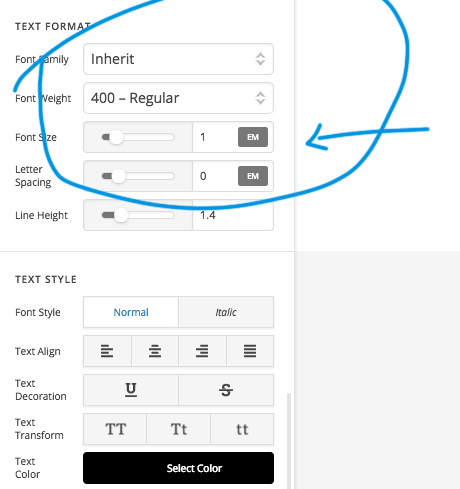
Headline element having the option to change size and color etc.
Regarding the paragraph spacing, you can add custom CSS for that.
p {
margin-buttom: 10px;
}
You can change the value here.
Hope this helps!
I added the css. didn’t do anything
Hi There,
Thanks for your confirmation!
but you didn’t answer my question that how your pages are built with.
For default page and post title
Please use this CSS and let us know if that works.
.entry-title {
 font-size: 20px !important;
}
Hope this works!
They are build with the normal wordpress builder
Hi There @jerryburns
Upon checking your Themeco account, I do not see any site URLs assigned to your license. Could you please provide us with an example page URL, so that we can check your issue and assist you accordingly.
Thanks!
This topic was automatically closed 10 days after the last reply. New replies are no longer allowed.