Header with 2 bars and one backround image

hi! :slight_smile:

first of all, i have to say thanks for the awesome support from you!

now i got a question:

i made a header with 2 bars. in the first bar is the main navigation, in the second bar is some text and logos.
is it possible to have one background image that covers all two bars? so the logo is fullscreen?
or should i place all in one bar?

thanks in advance for your help.

cherrs
harry

it would be great if taht will work with 2 bars, because bar 1 with the main navigation, should be sticky…

edit: or it is then possible to solve that sticky issue wih a third bar with main nav, that is hidden on start…?

thx again :slight_smile:

Hi Harald,

Thanks for reaching out.

You have two options, first is adding it through CSS, example, add this to your Theme Options > CSS with the URL of image background.

header.x-masthead {
background-image: url(http://example.com/example.jpg);
background-size: cover;
}

With this setup, the background color of header bars should be transparent. Else, it’s not gonna work.

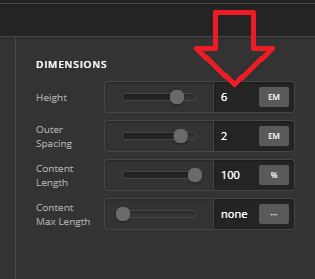
The second option is if your header bars are sticky. With that, you have to add the same image for each header bar’s background. BUT, you have to change the background position of the second image equal to the height (but negative value) of first header bar. This creates an illusion of single background image which in reality, two backgrounds.

First Header bar
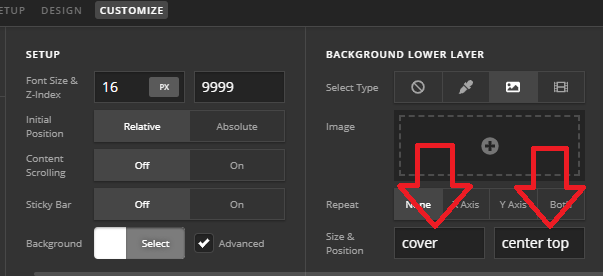
Second Header bar
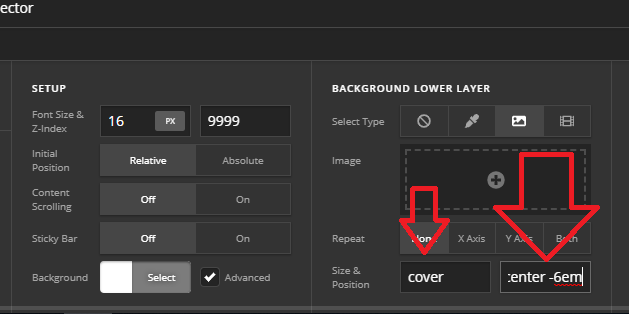
The downside with this is when the header bar shrinks, then two background images will not going to sync properly.

Thanks!

1 Like

hi rad!

thanks again for your help. so i need first option.
i imported the code to theme options => css and changed the url.

but it does not work for me. hm anything i did wrong? can u help me again pls? :slight_smile:

cheers

Hi Harald,

May I know which site should have this? Please note that the CSS will not work if there is a fixed custom header bar in Pro.

Thanks!

hi rad,

thanks again for your reply. it worked now : i had to leave the haeder tag. so the final code that worked look like this:

thx again foryour awesome support

You’re most welcome!
We’re glad @Rad were able to help you out.

This topic was automatically closed 10 days after the last reply. New replies are no longer allowed.