In the link below, this X-pro site has the navigation on the left side. Is there a way to force all the content to fit vertically regardless of the browser height? My client uses a very short browser height and would like to see all content fit (without scroll bars), even if it’s super tiny. Any way to do this?
Hi @injustwetrust,
Thanks for reaching out.
Can you please elaborate on what you are trying to achieve? Providing a screenshot marked with the section or any videos will be a great help to understand.
Thanks
I have attached a screenshot of a typical browser window and another of a compresses browser window. When the browser height is reduced, I would like all the left-hand navigation elements to scale to fit in the place, without using scroll bars.
Normal:

Compressed:

Hi @injustwetrust,
Thank you for reaching out to us. I see you’ve quite a few menu items and other elements as well in your left header, containing them vertically without scrollbar for smaller resolutions might not be possible. One solution is to turn on the Content Scrolling of your left header Bar under Setup:
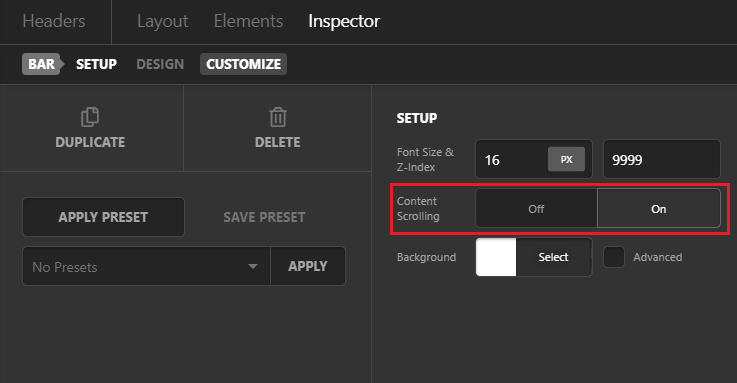
This will enable the scrollbar so your content doesn’t get cropped in small resolutions.
Alternatively if you don’t need to show a scrollbar then you need to re-arrange your content in the left header to fix this issue. For example you can add a top header bar and move some of your elements in the Top header.
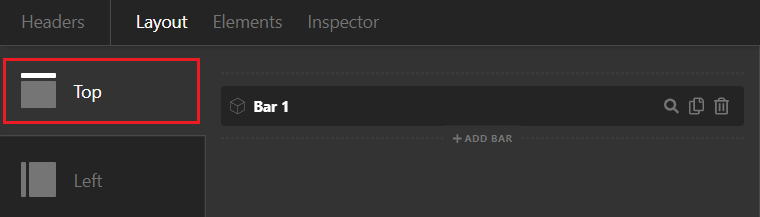
You can move the logo which is taking quite a space and address to the top header. This should resolve the cropping issue.
Hope this helps!
This topic was automatically closed 10 days after the last reply. New replies are no longer allowed.