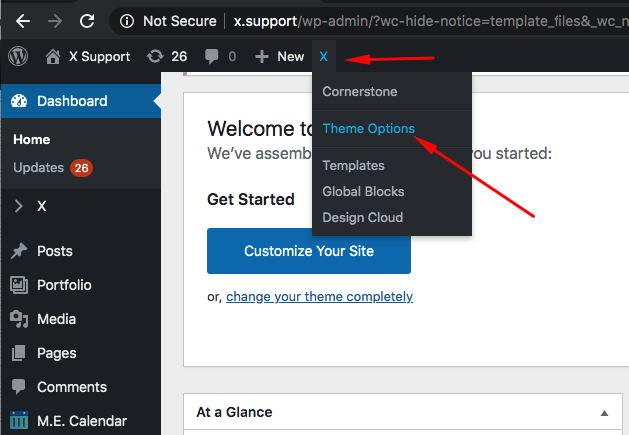
Header / Theme Options

Hello;

I’m having trouble finding where to style the header using X theme. As well, I need to change the favicon. Where can this be done? Also, I’m having trouble finding theme options in X theme. When I click on X all I see are all the plugins that come with the theme. Please help!

Thank you,
Stephanie
Hello Stephanie,

Thanks for writing in!

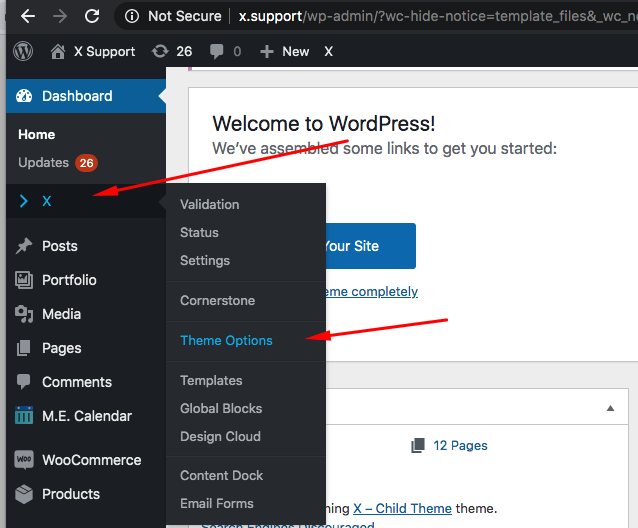
Please go to X > Validation first so that Cornerstone plugin will be installed automatically. And then you can go to X > Theme Options to style the header.

I can also see that you are using Ubermenu so you will need to style the menu in Appearance > Ubermenu.

Hope this helps.

Thank you for the detailed response. I think I may have done something wrong because when I hover over X that menu doesn’t come up and X isn’t in the top bar either. I have to click on it and it in the dashboard and it takes me to the X plugins page. What can I do to get that menu with Validation and theme options in it? I re-activated cornerstone even though I built the site with WP Bakery.

Thank you,
Stephanie

Hi Stephanie,

Even if you don’t use the Cornerstone, X requires it, that is why you did not get the submenus when you hover over the X because you did not install/activate the Cornerstone, make sure your Cornerstone is up to date (4.1.2) so it’s compatible with X.

You can easily update your Cornerstone by deactivating and delete it, then a notice will show on top of your admin dashboard to install Cornerstone, follow that notice to reinstall the latest Cornerstone.

Wordpress has a native option for adding favicon, please see the following article.

How to Add a Favicon to Your WordPress Blog

Thanks,

This topic was automatically closed 10 days after the last reply. New replies are no longer allowed.