SOS…I have deadline for this adjustment to Home Page banner which drawn from Slider Revolution. It has always centered on Mobile. I added a graphic overlay and it looks fine on desktop, but does not center on Mobile.
Hi @windhover4,
Thanks for reaching out.
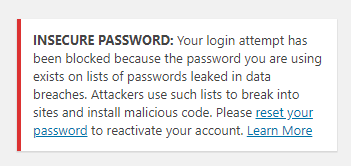
I logged in and can’t continue due to this, please provide a working login credentials 
For the meantime, please check this https://support.stylemixthemes.com/revolution-slider-responsive-settings. Then center your layer for each device.
Thanks!
Password: *******************
Thank you. Got it. The link was helpful in illustrating that you can center each device differently.
Glad it’s working now, cheers! And you’re most welcome!
Rad, Please see this image on my mobile feed. I replaced it at the same time as the Header problem developed. It is not in Slider Revolution. I replaced the image that was in that position. I have resized it down several times, but it still fails to show the full image in the Mobile feed. Thanks
Hi @windhover4,
Can you please provide us a screenshot of the image you are referring to and how it looks it your end.
I checked in mobile and this is how it looks.

Please note that you can reposition any layers in revslider on different screen widths.

2. Screen/Device
To use this option, you first have to enable a Custom Grid Size for additional screens/devices.
Toggling between the different options here will allow you to style and position your Layer content based on the selected screen/device.
For example, if you had a text-based layer, you could assign it a font-size of 64px, with a top-right position for desktop view. Then if you switch to the smartphone view, you could change the layer’s font-size to 32px, and give it a bottom-left position.
For more information: https://www.themepunch.com/revslider-doc/slide-layers/#layercanvas
Hope this helps
Thanks for taking a look. The image I am asking about now is lower down the page. Please see Mobile screenshot.
Hi @windhover4,
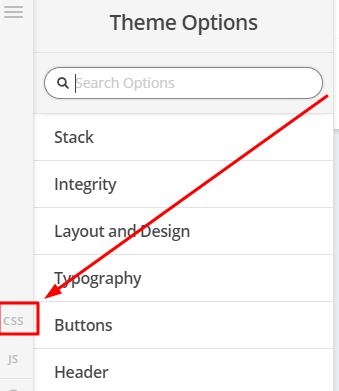
To fix it, you can try adding this in Theme Options > CSS
.x-section.my-pic {
    background-size:contain !important;
}
Hope that helps
Hi Paul,
That did not fix it.
Hello @windhover4,
I have inspected your page and I could not find the code given by @Paul.r. I just noticed that you have installed Swift Performance plugin. Please clear all your plugin caches and regenerate the HTML, JS and CSS files first before testing your site again. You maybe having a caching issue.
Please let us know how it goes.
This topic was automatically closed 10 days after the last reply. New replies are no longer allowed.