Header not rendering after update

I have a pretty standard header using the Pro theme. I just updated to WordPress 5.3 and Pro 3.1.1. I also updated the Yoast Plugin and “Hide SEO Bloat,” but made no other changes. After doing all that, the icon for my search modal is now cutoff in the header:

When I attempt to edit the header, the whole area just displays an error that says:

There’s nothing custom added on the header, so the HTML error isn’t mine. Can you help, please?

Hi Dannette,

If the error is not from the element you have added on the header, please try checking for a plugin conflict. You can do this by deactivating all third party plugins, and seeing if the problem remains. If it’s fixed, you’ll know a plugin caused the problem, and you can narrow down which one by reactivating them one at a time.

In case it is not cause by any plugin, we need to check your setup. Please share site URL and credentials inside a secure note. Thank you.

I tried de-activating every plugin except UberMenu, and the problem still occurs. (I forgot to mention that I am using UberMenu to create my menu, so maybe that’s part of it…) Actually, even with UberMenu deactivated, it still occurs. It’s just that the spacing is even worse because the rest of the menu is rendered incorrectly.

Sending URL and credentials privately.

Hi Danette,

Thanks for reaching out.

I don’t see any Ubermenu from your header, all I see is inline menu and layered menu which are builder’s built-in element. But I do see it in the front, may I know how you integrate it? It could be the reason for that HTML error message since it automatically replace the inline menu element. Please check this https://www.youtube.com/watch?v=_PUf-rcnRGM

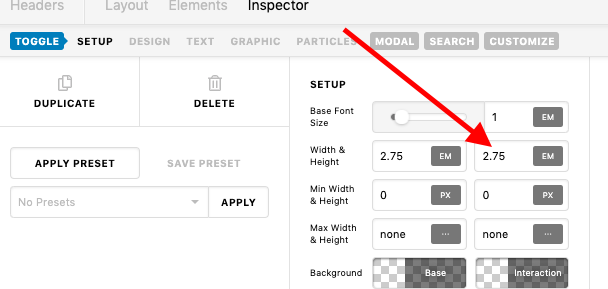
And the reason the icon is clipped is due to its height.

And may I know which spacing issue you’re currently referring?

Thanks!

Thanks! If fixed the clipping of the icon by changing the height back to “auto.” It’s weird that it wasn’t an issue before the update, but it’s fixed now.

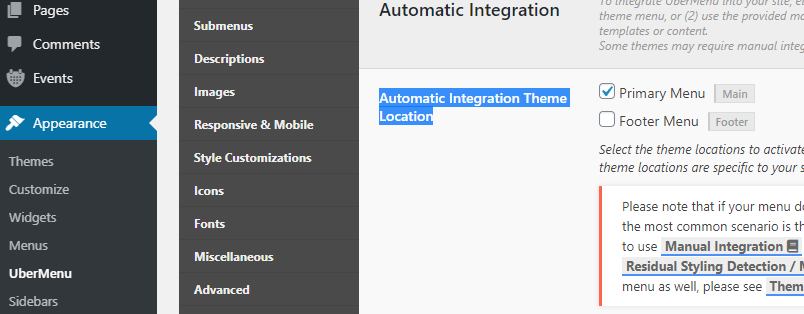
I believe the UberMenu setup is working because my header’s “inline navigation” element points to the “Location: Primary Menu” and in the UperMenu settings I have “Primary Menu” checked for “Automatic Integration Theme Location”:

You’re welcome!
We’re glad @Rad were able to help you out.

Yep @Rad was able to solve part of the issue, but I still don’t know why the menu isn’t rendering on the back end and instead displaying the “invalid markup” error.

Hi Danette,

Can you try disabling the automatic integration? Then please follow the video for manual addition of Ubermenu. The problem with automatic integration is it alters the structure, hence, it is no longer a valid builder element, but something else.

Thanks!

This topic was automatically closed 10 days after the last reply. New replies are no longer allowed.