I am making a new header for http://www.beautifulumedspa.com using Pro/Cornerstone and the new header is positioned a the top of the screen so its essentially covering the page. How can I make the new menu here: http://www.beautifulumedspa.com/demo-home/ align like the menu on the current site?
Hi @kvpadmin,
Thanks for writing in.
Do you mean putting the header to the right side? Because your new header is on the side here http://www.beautifulumedspa.com/ and not on top of the screen. If yes, then you should also position your header to the side for http://www.beautifulumedspa.com/demo-home/ (it’s currently on top).
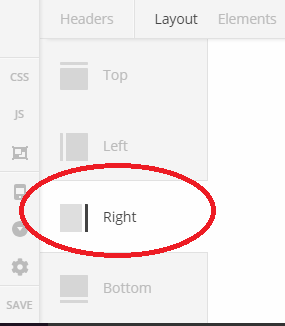
Thanks!
It looks like I needed to create the header in the “side header” area. It’s not a toggle I can switch? Is there an easier way to move my header content from the top to the side without starting from scratch?
Hello @kvpadmin,
Thanks for updating the thread. 
There is no need to recreate the elements. You have the option to drag and drop the elements from one header to other. Here is a screencast that you can take a look.

Thanks.
This topic was automatically closed 10 days after the last reply. New replies are no longer allowed.