Header issue since upgrade to ProVersion: 4.3.3

Hi

I have been working on a staging site for my client and since the upgrade to ProVersion: 4.3.3 the header has stopped working correctly.

The live site is https://bohillpartners.com/
The staging site can be view here http://x0ipu.hosts.cx/

When I look at the code it looks like the header structure has changed after the update which is adding padding and giving a z-index of -1, is there a setting I need to alter to keep the same structure as the live site?


Thanks in advance

Hello @henrybag,

Thanks for writing to us.

I checked your site it seems that the style is rendering from the Siteground cache style. I would suggest you purge all the cache and then check it again.

I have also noticed that you are using the Integrity Stack on the staging server and on the live domain you are using Renew Stack. Please note that on the basis of the Stack the styling may change.

Hope it helps
Thanks

OK I thought I’d cleared all the caches - will try again and also fix the Stack. Thanks

Have cleared the Siteground cache and the DNS cache checked in an incognito window and another browser. The Stack is the same on both now but am still getting the same. Can you confirm if you are seeing a different header on the live and staging? the only difference now is the staging one is running on 4.3.3

Hi @henrybag,

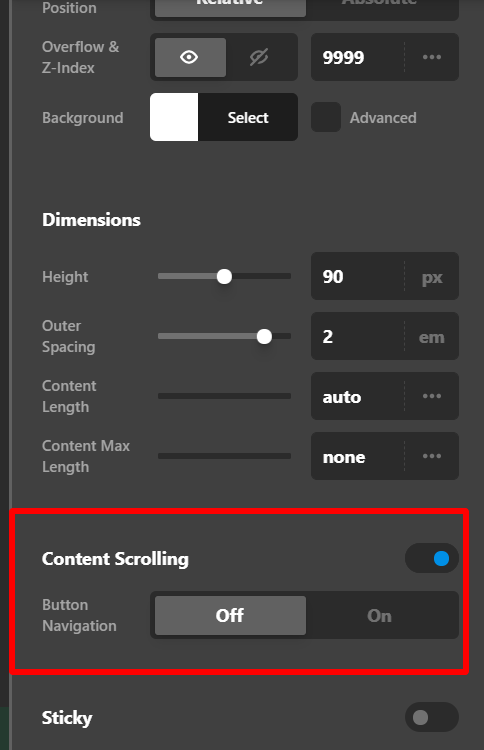
It seems that you enable the content scrolling of your header bar in your staging area that’s why the header is not working as it is. I suggest that you turn it off.

Hope that helps.

Thank you.

This topic was automatically closed 10 days after the last reply. New replies are no longer allowed.