Hello
My header is set to auto for height, but the “desktop” view the header is way to large … how can i make the height smaller on the desktop but leaving the rest of the device types alone?
Thanks
Hello
My header is set to auto for height, but the “desktop” view the header is way to large … how can i make the height smaller on the desktop but leaving the rest of the device types alone?
Thanks
Hi There @fxground
Thanks for writing in! You can assign a unique class into your Pro Bar or Container. In your case, assign a unique class into your Pro Container under Customize tab `my-container’
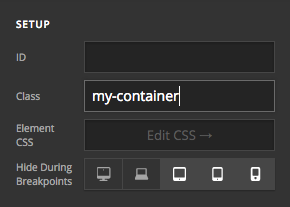
Then you can add the following CSS rule into your header’s custom CSS area.

@media (min-width:687px){
  .my-container {
    height:3em !important;
  }
}
Alternatively you can show different Bars or Containers to display on different device widths. If you prefer that path, you can follow our hide during breakpoints guide here (https://theme.co/apex/forum/t/hide-during-breakpoint-explained/17378).
Hope that helps.
This topic was automatically closed 10 days after the last reply. New replies are no longer allowed.