Header/Footer Not Displayed on Plugin-generated Page

I’m using a plugin with the Pro theme, that outputs a custom page using the page= query string parameter. The page outputs fine, but it’s missing the header and footer.

I’ve examined the code in the plugin’s template file and I can see it includes the get_header() and get_footer() functions in the template. Also, if I switch to the default WordPress theme, the header and footer are displayed, so the issue is specific to Pro. I’ve already tried disabling all other plugins, etc… but the issue persists.

Hello Brad,

Thanks for writing in! What is the name of the plugin you used? To better assist you with your issue, kindly provide us access to your site so that we can check your settings. Please create a secure note with the following info:
– Link to your site
– WordPress Admin username / password

To know how to create a secure note, please check this out: https://theme.co/apex/forum/t/how-to-get-support/288

Regards.

Hello Brad,

The given credentials is not working for us.
Please double check it.

Sorry about that, I updated the credentials.

Hi Brad,

To make sure that we are on the same pape, we do not support conflicts between our theme and unsupported third-party plugins, but meanwhile, we are going to do our best to help.

The Pro Headers and Footers do not use the WordPress native header/footer feature and it is a separate functionality. The way that the third-party plugin has the URL as a query string might contribute to the problem.

To make sure if that is the underlying cause, please kindly go to Pro > Theme Options > Header and temporarily select the Switch back to Original Headers option:
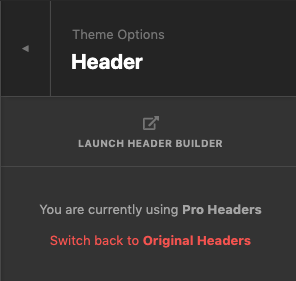
The option above will unassign the Pro headers and will use the WordPress original header for the theme. Kindly check if the header shows correctly in that case. I did not risk to do it myself as your website is live and I do not have permission to do the test.

If yes, then it shows that the plugin is not compatible with the Pro theme header/footer system and you will need to either avoid using the Pro header builder or accept having no headers for that specific page.

As a side note, it is possible to assign the pro header manually to a page via code. The way it works is to install the Child Theme and add a code snippet below to functions.php file:

add_filter('cs_match_header_assignment', 'custom_search_header');
function custom_search_header($match) {
	if (is_search()) {
		$match = 25440; // the post ID for your header
	}
	return $match;
}

The 25440 is the ID of the header that you have set globally and I found it by going to edit the screen of the header in question and checking the URL of the browser address bar.

There is a conditional tag is_search() which is used for the search pages and is an example. You need to contact the third-party plugin developer and ask them to give you a piece of code that you can replace with is_search() to force the header to be assigned for that specific page.

I am not sure if it will work 100% and we can not implement the functionality for you, but I thought it will be a good starting point to open up a conversation with the plugin developer to handle the case.

Thank you.

I switched back to the original (non-Pro) header, but it made no difference. The header still does not appear on that page. You’re welcome to play with it, if you want, I don’t mind if the site displays the original headers while you’re working on it.

Hey Brad,

This case is similar to another reported case where the X and Pro headers are not displayed. The reason is the plugin takes supports regular WordPress themes only. Technically, though it uses get_header(), it does not take into account the priorities of our theme. Our theme is unable to set the Header and Footer.

Please have the plugin developer investigate our theme’s structure so that they could take into account the priorities. Or, they could also wrap the functionality to a shortcode so you could place the shortcode on a regular page so technically, it will be loaded within our themes template and not the plugin’s template.

Regretfully, we can do nothing on our end like the previously reported case.

Thank you for understanding.

This topic was automatically closed 10 days after the last reply. New replies are no longer allowed.