Hi there,
I have a header button in the form of an arrow pointing downwards.
It is set scroll down to a section ID “top”
It was working before, but don’t know what caused it to stop.
Can you please advise.

Hi there,
I have a header button in the form of an arrow pointing downwards.
It is set scroll down to a section ID “top”
It was working before, but don’t know what caused it to stop.
Can you please advise.
Hello @himoud,
Thanks for asking. 
Looks like you forgot to share the website URL. Can you please share website URL for us to take a closer look?
Thanks.
Hi There,
I found several Javascript errors on the site which is causing the error.
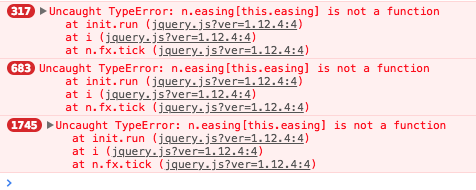
This might due to plugin conflict or custom JS. To test it please deactivate all third party plugins and remove any custom JS if you have.
Let us now the result.
Thanks
I have turned off all plugins and deleted all JS code.
Still not working.
Had to turn the under construction plugin back on for now.
Hello There,
I am another staff checking in this thread. Even with all the plugins deactivated, the issue still occurred. I noticed that you are using CloudFlare. This could just a site cache issue. Please login to your CloudFlare account and purge your site cache. It is also best that you disable the JS/CSS minify option in the “Speed” tab in your CloudFlare settings. I would highly recommend that you make sure that you are using the suggested CloudFlare settings which can be found here: https://xthemetips.com/using-cloudflare-rocket-loader-with-x-pro-and-x5/928/
Hope this helps. Please let us know how it goes.
Thank you for looking into this. I will certainly follow the guideline.
For now… I purged all the cache. Paused CloudFlare completely and still no change.
JS code has been removed so don’t know if it’s still causing errors.
Still not working.
Hello There,
I have logged in and check the settings and anything. Every thing is set up correctly. The JS error occurs only after you click the icon and it returns: Uncaught TypeError: n.easing[this.easing] is not a function.
After further investigation, I found out the the issue occurred because you have added this line $('a[href*="#"]').off(); in your custom JS. I have commented this out and the button is working now.
Please clear your caches again including your browser cache and check your site.
Thank you very much. That did the trick!
You’re most welcome!
This topic was automatically closed 10 days after the last reply. New replies are no longer allowed.
