Header builder - two blocks - floating header issue

Hi there,

I’m using a custom header on this site:

http://www.padthai.decorolux.com/menu/

The topmenu sticks and works fine, the one under it glitches (the . It is set to be a floating menu as well.


and dissappears if I scroll downwards.

Any ideas regarding what can cause this?

Thanks!
Hi There,

I can see you are facing z-index issue.
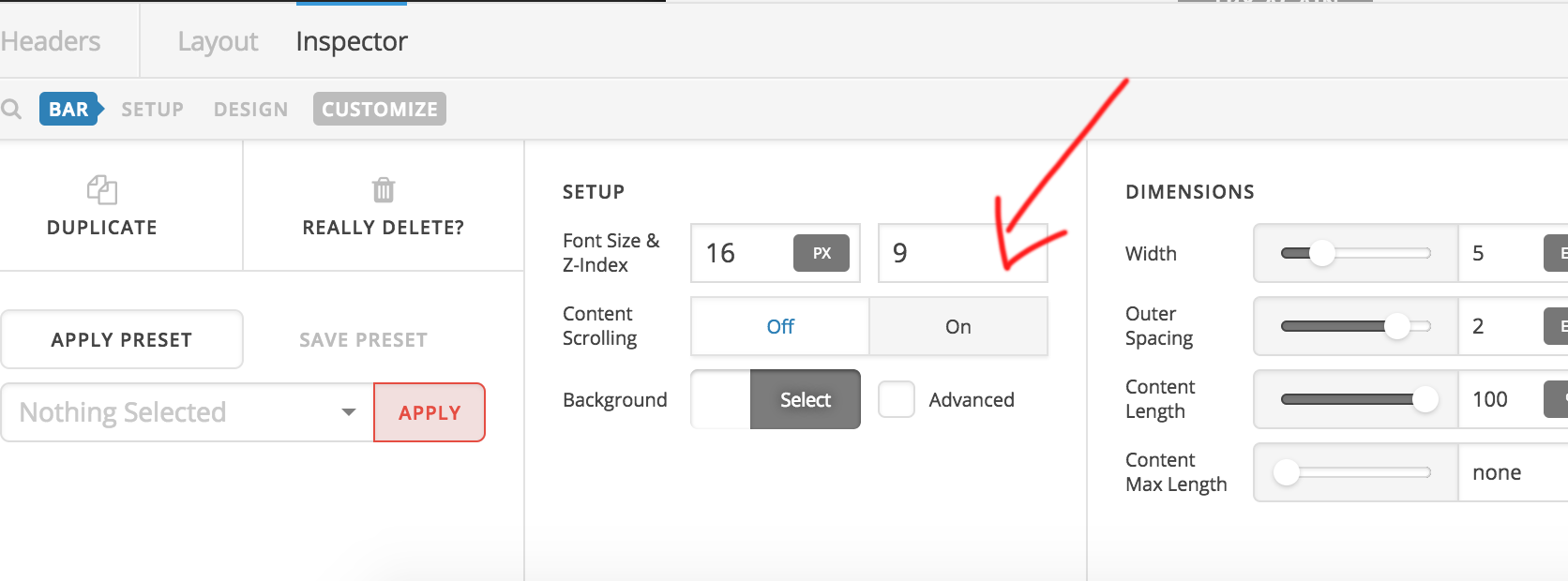
Please make the top bar z-index 9 and the floating menu bar z-index 8, it will fix your issue.
You can set z-index like in the screenshot.

Hope this helps!
Thanks

Hi there,

Thanks for the help, that’s def a step in the right direction. Now it moves as required, however, there’s a graphic glitch I would like to fix.

Here’s the issue: https://www.dropbox.com/s/8u0cjmjppok05iy/Screenshot%202018-04-10%2009.13.30.png?dl=0

The two menus overlap before one gets positioned under the other once I scroll down a bit.

I tried changing the x index the other way around, which seems to works, but this way the floating menu overlaps with my logo and I can’t position it to be on top with z-index.

Could you help?

Thanks!

Hi There,

Thanks for the update!

Please make the floating nav bar z-index as “6” it will fix your graphics issue.

For the second issue please use ths css in your Theme option -> Global CSS

.x-masthead {
    position: fixed;
    top: 0px;
    height: 122px;
    width: 100%;
    z-index: 9;
}
.x-main  {
    margin-top: 120px !important;
}

Hope this helps!

Thanks

This topic was automatically closed 10 days after the last reply. New replies are no longer allowed.