Have a row 100% within a column

I have a global block that has 6 columns and within each of them is a row. This is what it looks like on a large screen:

However as the width of the screen is made smaller they start going out of line:

what can I do to make it so all the rows are 100% of the height within the column?

Thank you
Jason

Hi Jason,

Thanks for reaching out.
It seems that the top and the bottom padding of the parent column is the reason behind your problem, I would suggest you check by resetting it to 0px.

Hope it helps.
Thanks

Good morning @tristup and thank you for the reply,

I did a reset to 0px as you suggested. However all it did was made the left and right of the column touch the row:

I would like it so the heights of all the columns were always matching

Thank you!
Jason

Hi Jason,

It seems that you have set the padding for left and right too. You need to set the padding only for top and the bottom not for the left and right.

Thanks

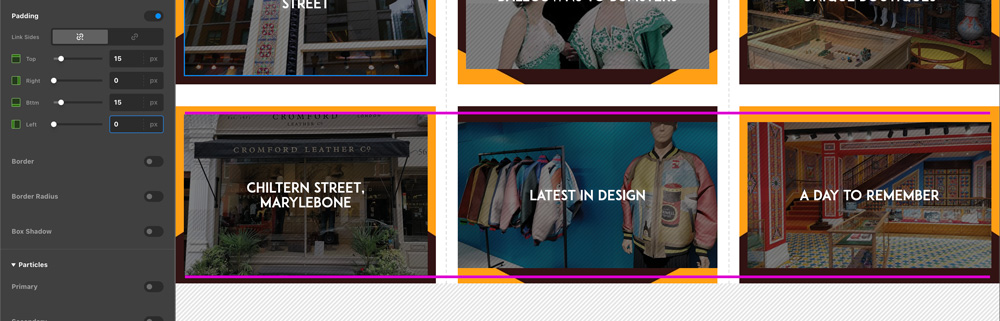
Thank you for the update @tristup, however this does not fix the issue:

Check out the purple line - this is taken from the largest column on the left. This is because at a certain width of the screen the text of ‘chiltern street…’ moves to a second line. This then makes the next two look wrong.

How can I have it so all these columns with the background image in stay the same height?

Thank you,
Jason

Hello Jason,

It seems that the column’s background images are in same height. Please have a look at the given screenshot below. You might have fixed your issue or there might be the issue of cache at your end. I would suggest you please clear your browser cache and then check it again.

Hope it helps
Thanks

Thank you for the reply @prakash_s,

please make your screen a little thinner so the chiltern street text goes onto 3 lines - you will then see the issue

Kind Rehards,
Jason

Hi Jason,

I have mentioned multiple times that you need to set 0 padding for Top and the Bottom padding, but as per the screenshot given by you in your last post, it shows that you changed it for Left and Right. So I would suggest you check by setting it for Top and Bottom and let us know if that works.

Thanks

This topic was automatically closed 10 days after the last reply. New replies are no longer allowed.