I have created a new team page for our website. I have only done Orange county page so far but every time that I click the menu on the mobile version it just links back to the home page. How can I get the mobile menu to link to the correct page.
Hello Ashley,
Thanks for writing in!
In your Navigation Layered element, make sure the Sub Menu Trigger is set to “Anchor” so the “Home” button is clickable and links to the Team Page Orange County.
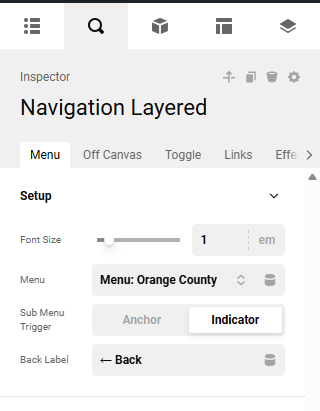
Kindly let us know how it goes.
Hi,
Thank you for doing that, however, it is not working correctly. Same with other links in mobile, we are making a new team page for all locations and only mobile is not working.
Hi again, it is also not linking correctly on the team slider component only on mobile when I changed the link everywhere. All locations are having the same issue with mobile.
Hello @RevealHM,
I checked it on my Android phone, and it is working fine on my end. Please have a look at this video recording, given the secure note. I would suggest clearing your browser cache and checking it again. If the issue still persists, please share the steps to reproduce it so we can replicate it on our end.
Thanks
Hi, So your screen recording showed the issue. When you clicked on “team” it took you straight back to the home page when it should be taking you to our team page with the “owner Allison” right on top. It is also is linking incorrectly on the component “team slider” on all locations as it should take it to the main team page.
Hi Again, I think there is just an issue with our mobile part as every time I edit something on the mobile size it does not show up on the live website. for example, I have screenshotted an edit I made to a footer and then what it looks like on the phone. I have cleared the cache multiple times and even looked on others phones and there is no change.
please see the spacing, size and date that were changed on the backend but not showing up correctly.

Hello Ashley,
Your Team menu item is linked to a daft page.
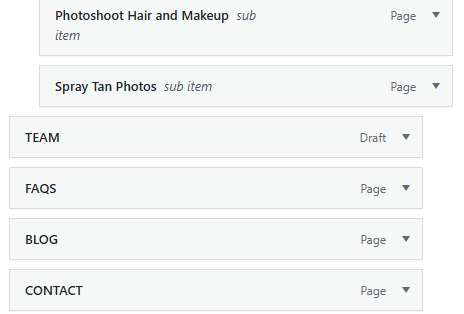
It needs to be linked to the published page.
As for the footer, I am seeing the correct format on my Android phone. You may need to use private browsing mode in your Safari or use another mobile browser like Brave or MS Edge on your iPhone.
Hope this helps.
Hi there,
thank you for finding this. However, since I made new pages and drafted the old team pages can you please let me know how I can get the new published pages onto the menu?
Hello @RevealHM,
To add your newly published pages to the menu, go to Appearance → Menus. From there, select your menu, add the new pages, remove the old draft pages, and save the changes. Please have a look at this article to learn more about editing WordPress menus.
Hope it helps
Thanks
This topic was automatically closed 10 days after the last reply. New replies are no longer allowed.