I have been using the Gym Demo as a base template and some where I changed the font color on the “Cards” on the home page so that the header on the backside doesn’t match the rest of the text on the back. Where can I change this back?
Hi There,
Please add the following CSS under Customizer > Custom > Global CSS:
.x-face-outer.back .x-face-title,
.x-face-outer.back .x-face-text {
    color: #000;
}
Thank you,
That changed the color of the body, but not the header portion. I still want the header and the body text to show white on the back. In my editor it shows up correctly, but in the live page, it is wrong.
Hi There,
On your custom CSS please look for a CSS rule that looks something like this:
.home .back .x-face-title {
	color: #000;
}
I can’t guarantee though If that is the custom CSS you applied on your card because you did not provide an URL so we can inspect the site.
But it should be closed to that, that is because .home means on home page, .back means back of the card it can also be .x-face-outer.back, and the .x-face-title as referring to title.
Hope it helps,
Cheers!
I found a section that has .x-face-title. I added the color: #000 code. Didn’t seem to have any change.
the url is burnsltd.net
Thanks
Hi There,
Thank you for the URL, now I see what CSS block that is coloring your card back title. It was the code below. Specifically the h4 strong
h1 strong,
h2 strong,
h3 strong,
h4 strong,
h5 strong,
h6 strong {
  font-weight: inherit;
  color: #052175;
}
That selector is stronger than mine because it specifically targeting the strong tag.
You can add strong selector to my given code above to make it more specific.
.home .back .x-face-title strong {
	color: red;
}
That selector is like saying:
target the title that is wrapped inside strong tag on the back of my card on home page
Hope it helps,
Cheers!
I think that did it. Thanks.
I have a follow up question. On the same url, all the headings beneath the “cards” are the same blue color even though I have the headings set as a gray color in the theme settings under typography. For example, where it says “Its all about the mission,” only mission is tagged with Strong, but everything is colored blue even though only “mission” should be blue. It appears that the normal, small and srtong tags are all showing blue but only the “strong” tag should be blue. Everything else should be gray.
Hi there,
It is because of the code below. It overrides the color that is set in the element setting.
h1 strong, h2 strong, h3 strong, h4 strong, h5 strong, h6 strong {
    font-weight: inherit;
    color: #052175;
}
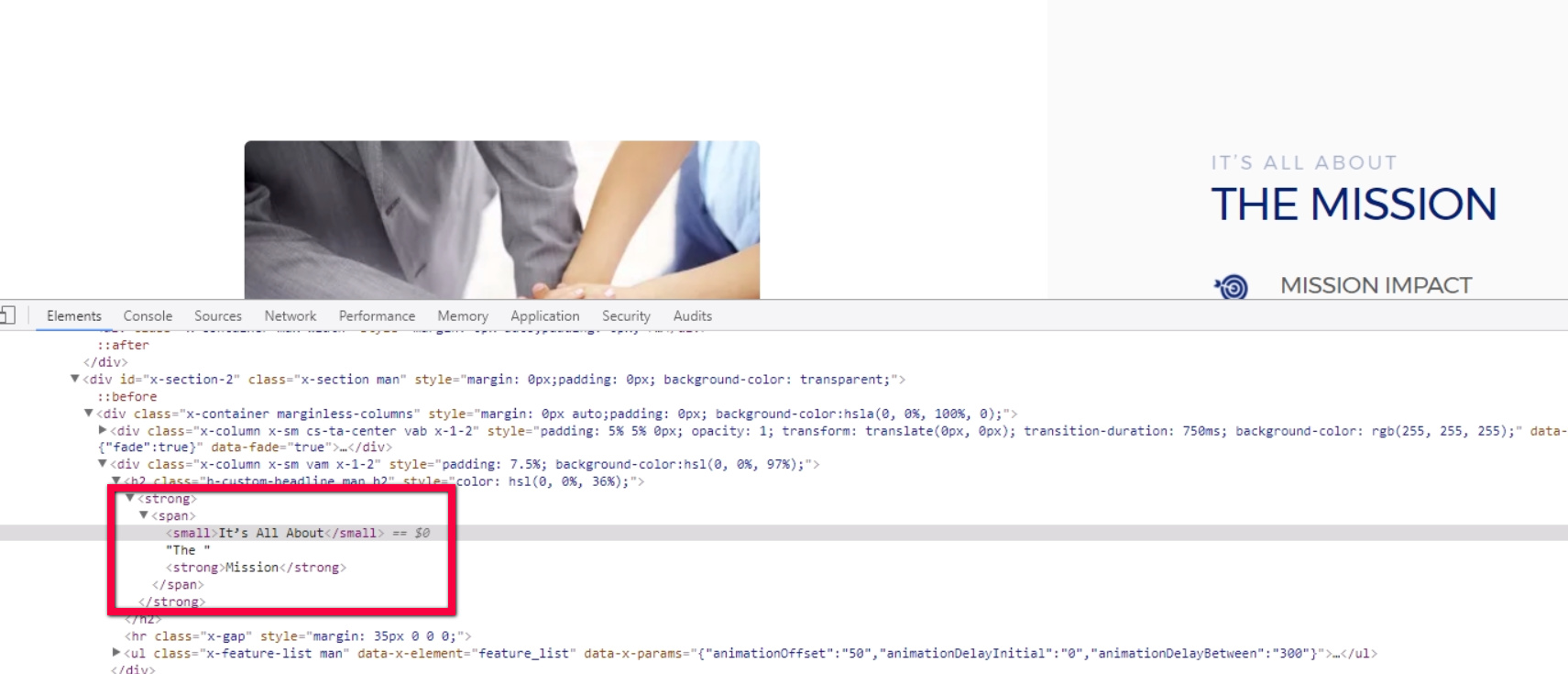
The Its all about the mission headline is wrapped in a strong tag and the CSS mentioned above gets more precedence that the color that is set the in outer heading element.
Kindly check the code in custom headline element and make sure that not all of the text are wrapped inside the strong tag.
Thank you. I found that I didn’t close out the strong tag after the first headline thus keeping all further headlines in the strong format. Thanks.
You’re welcome.