Guide to setting up Woocommerce design?

I am trying to copy the look of the Renew page: http://demo.theme.co/shop-renew/

My shop is a standalone Wordpress installation in the /shop/ subdirectory of another Wordpress site. I set the stack to Renew, added a test product and changed the logo but the site looks very different than the demo:

clipimage

  • How do I get rid of “THE SHOP” right under the header?
  • Why is the logo not centered?
  • Why are the products not showing up?

I tried searching around the forum for a guide but didn’t find one.
Hi @quantazelle

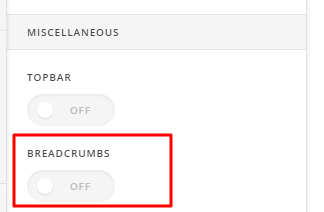
  1. To get rid of “THE SHOP”, you can disble breadcrumbs under Theme Options > Header > MISCELLANEOUS

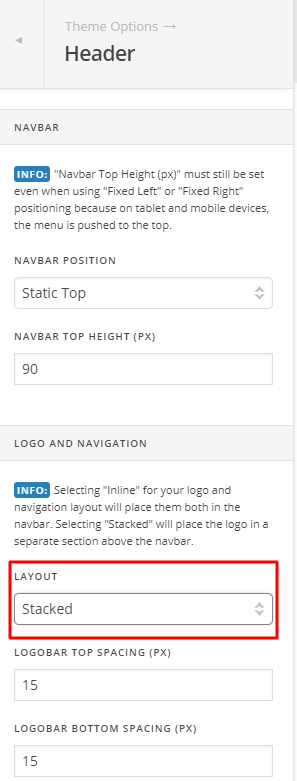
  1. The Renew demo uses Stack layout for logo and menu and seem to be using inline.

You can change it in Theme Options > Header > LOGO AND NAVIGATION

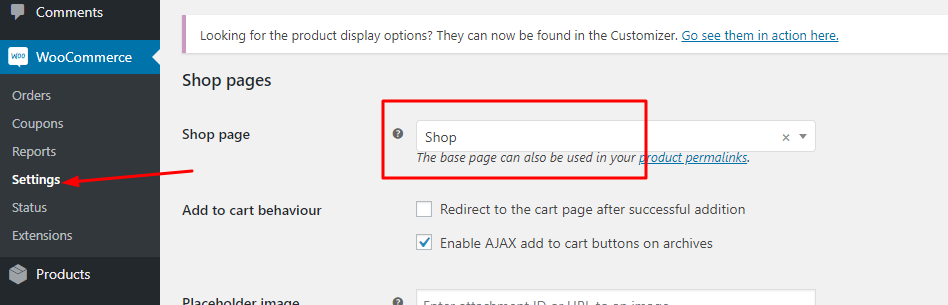
  1. Make sure to set that page as your shop page

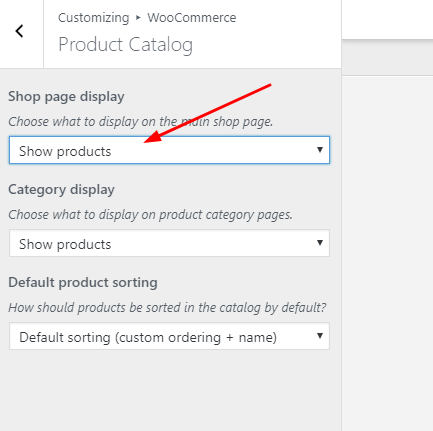
Then go to Appearance > Customize> woocommerce and set it to show products

Thanks

This topic was automatically closed 10 days after the last reply. New replies are no longer allowed.