Hey there
I am trying to get my embeded google maps squared so it is not filling the whole coloumn. any idea how to achieve it?
my goal is to have a circled gmaps shwoing on my website
thanks a lot
maik
Hey there
I am trying to get my embeded google maps squared so it is not filling the whole coloumn. any idea how to achieve it?
my goal is to have a circled gmaps shwoing on my website
thanks a lot
maik
Hello Maik,
Thanks for writing in!
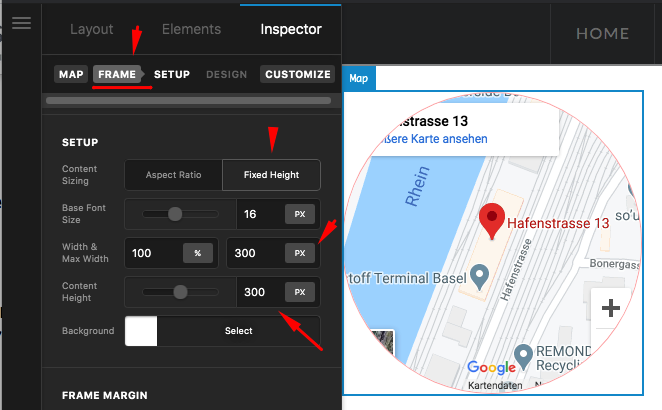
Please edit your page and select your Map element. Find the Map > Frame tab.
$el {
  overflow: hidden;
}
This will make sure that the iframe will be contained within the circle.
Hope this makes sense.
thanks a lot it worked. but can i center the map within the coloumn? thanks
Hello Maik,
To center the map, go to the Frame option then set the right and left margin to auto:
Hope this helps.
Hi Maik,
I don’t see the weird scrollbar. Also, did you try the previous suggestion to center the map on the column? It should work like this: https://screencast-o-matic.com/watch/cYfifcaIUn
wow thanks - works perfectly. i fixed the scrollbar myself
You’re welcome Maik!
We’re glad we were able to help you out.
This topic was automatically closed 10 days after the last reply. New replies are no longer allowed.
