Hello:
I can not get my map t work I keep getting a js error despite creating an api key. I tried reading about it in forums but nothing seemed to work It’s on my homepage can you please take a look…
Hello:
I can not get my map t work I keep getting a js error despite creating an api key. I tried reading about it in forums but nothing seemed to work It’s on my homepage can you please take a look…
Hey there,
The given credentials doesn’t work. Please check. Please also check your API key restriction setup to see if it’s correct. You can also give us a screenshot in a secure note so we could see it. For more details about restrictions, please see https://developers.google.com/maps/faq#switch-key-type
Thanks.
I updated login sorry about that. what restrictions should I edit to- http referrer or IP address?
Thanks
Hi again,
Can you please check with your hosting provider to see if they are using mod_security on your site, sometimes mod_security blocks certain type of requests, disabling it should fix the issue. If this doesn’t help then try re-installing Cornerstone plugin.
Let us know how this goes!
My Server said the following:
We have many mod_security rules enabled on all our servers, including on Cloud Servers, as part of the security measures that we have taken.
I checked your Cloud Server’s error log for entries with your IP address 96.248.39.76 but none appeared.
I don’t want to uninstall cornerstone and reinstall it for the sake of losing my development. I have thus far spent over 8 hours developing. Also I am not facing ANY other cornerstone issues.
Please can you login and take a look?
Hey There,
Hope you are doing great 
When I changed latitude and longitude, the website was able to load MAP on frontend(Your previous latitude and longitude{ 74°06’33.9, 41.616164 }). I have kept the latitude/longitude for you to check.
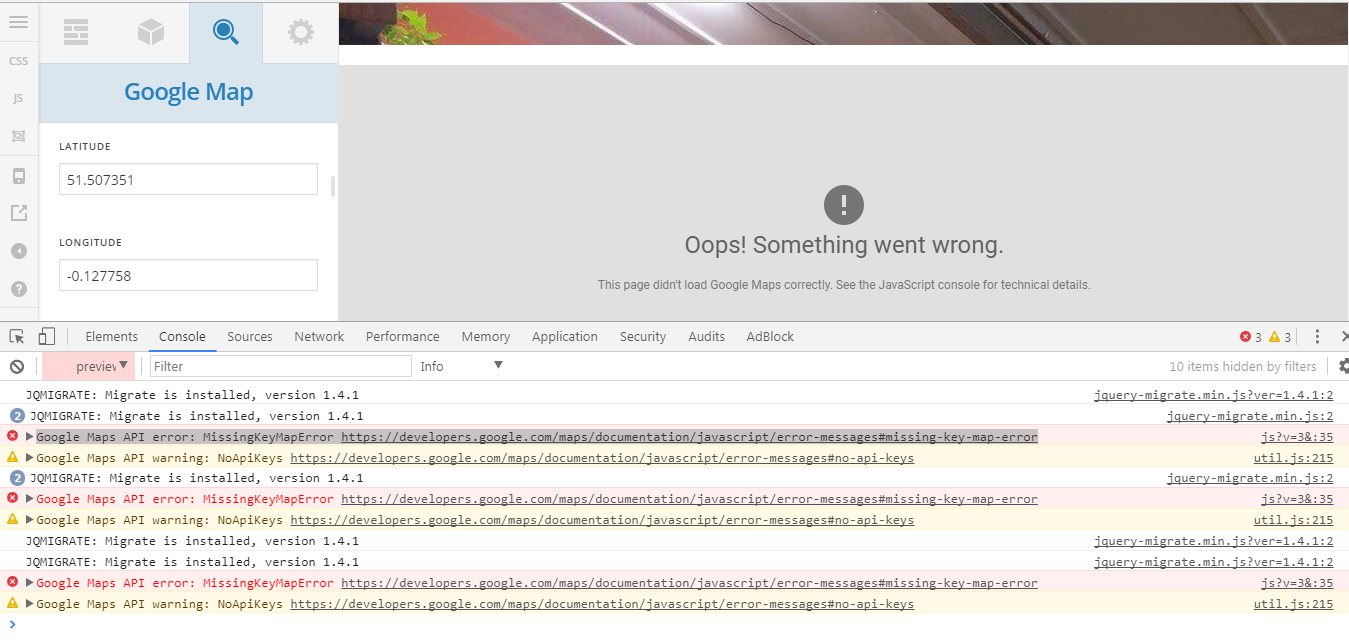
MAP is not showing in cornerstone. Your website getting “Google Maps API error: MissingKeyMapError https://developers.google.com/maps/documentation/javascript/error-messages#missing-key-map-error” error in back end. Can you please check?
Regards
Yes I confirm that I am getting the missing key error- but as you can see I have an api key. Why is this happening in cornerstone?
Hi There,
Upon checking your website the map on your home is working.
Please clean your browser cache and test it again.
Thank you
Hi yes it is working on the frontend but not in cornerstone. This is what we were discussing above. Is it normal for it to not show up in cornerstone?
Here is a link to the error in cornerstone. Still a JS error showing:
https://parentcompany.com.au/wp-content/uploads/2017/07/Screen-Shot-2017-07-07-at-2.29.30-PM.png
Please advise
Also how do i get the actual location marked on the map? I enabled “start open” and the map is not working again.
Hi there,
If you only have one marker, then your marker lat/long values should be the same as your main element’s lat/long values. Currently, your marker lat/long doesn’t match.
And are you sure it’s the correct lat/long values? I checked it on the actual map and it’s pointing at the sea. Would you mind providing the exact location on the map so I could try that and create an embed version of it?
Thanks.
that was it thank you! I had to make my lat and long the same for both the map and map marker.
My last question on this is- i still get a js error in cornerstone. Is it ok to ignore this or does it mean problems on the horizon?
Hi again,
Have you enabled the API key from Google API Console for the current project? This usually happens when API key is not enabled. Please follow steps mentioned here https://developers.google.com/maps/documentation/javascript/get-api-key#standard-auth
Hope this helps!
This topic was automatically closed 10 days after the last reply. New replies are no longer allowed.