Hi. I’m having trouble with Google Maps displaying as a full width element. I’ve turned off the inner container and margin less columns and it’s still showing as a small box on the left of the page. Help?
Hi There,
Click on the frame tab of your map element and adjust the max-width from 500px to 100%
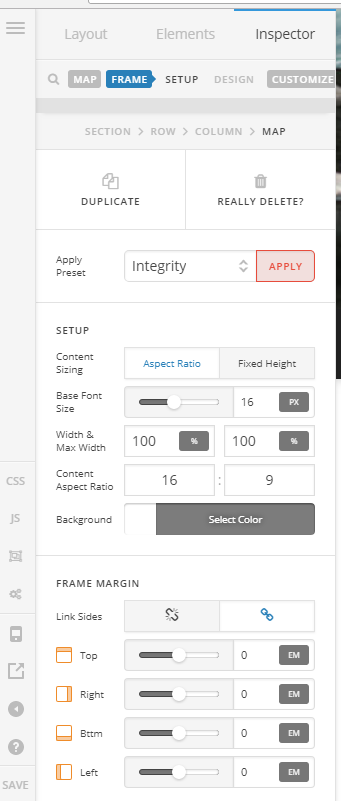
Hope it helps!
Thank you. That did it!
Now how do I get the address marker to show up? Right now it’s just showing a map.
Hi There,
To add a maker use the Classic Google Map Element instead.
Hope it helps!
Im having some of the same issues. I created a map using Classic Google Map editor, added the lon & Lat, API and it looked good up until I left the editor and I now get an “Oops! Something went wrong” error message. Temp URL is http://5d8.5a1.myftpupload.com/
How do I fix this???
Hey There,
Thanks for updating this thread. You are experiencing the issue because your API is not yet active.

To know how you can add or generate a new API, please check this:
Hope this helps.
Thanks!!! That worked!
Glad to hear it!
Cheers
This topic was automatically closed 10 days after the last reply. New replies are no longer allowed.