Not sure why this is happening. but the Google Map on the bottom of the page is covered by the footer on mobile devices. How do I stop this?
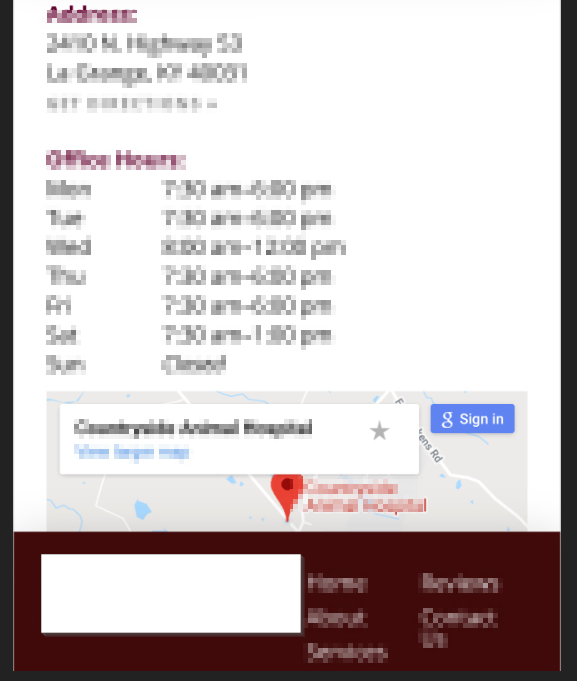
Not sure why this is happening. but the Google Map on the bottom of the page is covered by the footer on mobile devices. How do I stop this?
Hi @w3developing,
Thanks for writing in.
To fix it, add margin or padding to the section where your map is located.

Hope it helps.
Let us know how it goes.
Thanks.
So this seems to work when tested with chrome dev tools but for some reason the CSS won’t take. It’s in the stylesheet, but it’s not showing up. There isn’t a chaching plugin and I’ve cleared browser cache. Any ideas?
Hi There,
Look for this block of code on your pro-child’s style.css file:
@media screen and (max-width:979px){
    a:hover, a > img:hover {opacity:.85;}

    div.x-main{
		position: relative;
		top: 128px;
		}
	#x-site{
		border:0;
	}
}
And update that to this:
@media screen and (max-width:979px){
    a:hover, a > img:hover {opacity:.85;}

    div.x-main{
		position: relative;
		top: 128px;
		}
	#x-site{
		border:0;
	}
	footer.x-colophon {
		margin-top: 128px;
	}
}
Hope that helps,
Cheers!
That worked, thank you! I don’t know why the other one wasn’t working.
Glad we were able to help 
This topic was automatically closed 10 days after the last reply. New replies are no longer allowed.