Getting section to fill area

Hi there,

I’m slightly confused about something: I have a white section that says contact on this page https://thelanguagesherpa.com/contact/ which I have managed to fix to the bottom of the header and stay max width.

I saved it as a template and pasted it onto this post https://thelanguagesherpa.com/russian-untranslatable/ (only changing the words inside). However, as you can see the pasted section has a gap between itself and the header and is not max width.

I don’t understand why this is - all of the settings are the same and there doesn’t seem to be any conflicting CSS… Could it be because the first example is a page and the second one is a post?

I was wondering if you could help me make the second example the same as the contact section (I will attach login details below in case this is helpful)

Thank you!
LS
Hello There,

Thank you for the very detailed post information. I made several changes in your site to fixed the issue. Regretfully all the changes did not take effect because of caching overload. I even temporarily disabled SG Optimizer and W3 Total Cache. It turns out that you are using Site Ground and it does have a cache as well. Could you please clear the site cache or temporarily disable the supercacher in your hosting panel? The SuperCacher is developed by SiteGround exclusively for their customers. It increases the number of hits a site can handle and boosts the website loading speed. The SuperCacher includes 4 different caching options for maximum optimization of your websites. You can access the tool by clicking on the SuperCacher icon in your cPanel.

For more information about this, please check it out here: https://www.siteground.com/tutorials/supercacher/supercacher_intro.htm

Hope this helps.

Hi Rue,

I flushed the cache and then disabled the SuperCacher, but it doesn’t seem to have made any difference.

LS

Hi there,

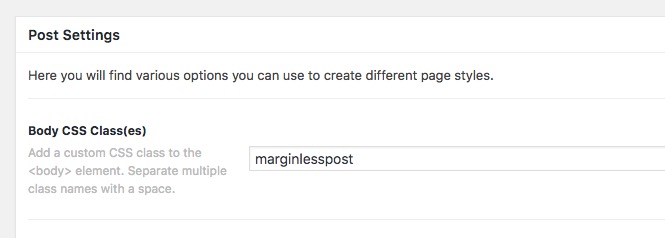
I went to the post in question and added the marginlesspost class to the Body option of the Meta Options:

Then I went to Pro > Theme Options > CSS and added the CSS code below:

.marginlesspost .entry-content {
    margin-top: 0;
    padding: 0;
}

.marginlesspost .x-container.max.width {
    max-width: 100%;
    width: 100%;
}

The reason that you saw the template you created is not full-width in the Post is that the post wrapper layout was limiting the content of the website including the template that you had. By adding the CSS and the class above I override the post default layout and made it full-width.

Thank you.

Thank you, Christopher - that worked perfectly!