Get rid of Integrity Background Image

I am trying to improve the speed of my website, and there is an image being loaded called “bg-integrity-1.png” on every page and I can’t figure out how to get rid of it. It is being served from ThemeCo servers, and I have tried to replace the background with my own image in hopes of overriding it, to no avail. My own image does replace the background on my site, but the old picture is still loading anyway.

Given the name of the image and what happens when I replace the background image in the Theme customizer, I’m assuming is a template image that comes with the theme, which is cool. But not being able to override it is slowing down my site upload by almost half a second. I have selected a base color (my preferred background option), but that seems to be overridden by the default image.

Please advise where I might be able to get rid of that setting, replace it with my own pic, get the color background options to work, or otherwise remove the image from my site as I don’t want to use it.

Thank you, Austin
Hey Austin,

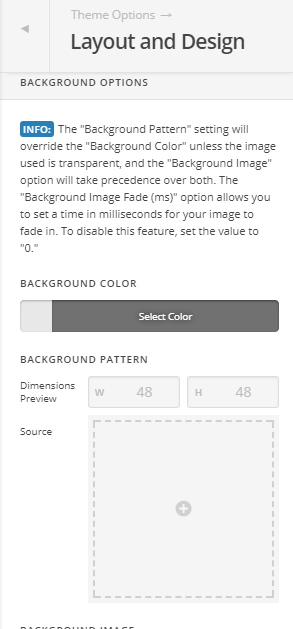
Overriding the Background Pattern in Appearance > Theme Options > Layout and Design will remove the default pattern.

You can remove the pattern after you’ve overriden it in case you don’t want a background pattern.

If you’re using a caching plugin, please purge all caches to ensure all change takes effect.

Thanks.

1 Like

So I added a ‘pattern background’ and it did override the themeco background… however, when I deleted it, it still loads in the page.

It is certainly a lot better than the previous option, but I would rather it not load if it’s not there.

As a quick fix to what i would like from a look/functionality balance… can you send me the original image that comes with integrity so that I can upload it to my server? that way I can still get the look i’m after without having to pull the image from your guy’s servers?

I the meantime… you may want to add it as a bug to your list that if color is selected as the background option of choice, it still loads an image anyway (which slows down everyone’s page speeds).

Thanks,
Austin

Hi there,

It should delete as well. Have you tried clearing your cache?

Also you can find the original image from the following link.
https://theme.co/media/bg-integrity-1.png

Thanks!

This topic was automatically closed 10 days after the last reply. New replies are no longer allowed.