General things I can't figure out, and I've hit a wall (Blog + fullscreen stuff)

I’ve spent the last few days building out my companies new website that will be the hub for our content marketing strategy.

It’s currently on a spare domain we had www.simplyvideoreply.com where it’s being built.

I have a goal to achieve, and it’s to build a blog content section like this (Without the search bar): https://www.addthis.com/academy, but would be happy with the same kind as themco’s.

So issues I’m facing:

My problem is making the posts page look beautiful and when I actually read an article the whole thing is pushed into fullscreen and looks terrible. I can’t figure out how to make it thin while maintaining a full-screen view on the main website homepage and all other pages.

If you go to the posts page on simplyvideoreply.com you will see exactly what I mean.

also I can’t find the option to reduce the size of the post thumbnail image? Do I need to make a direct edit to the themes functions file and set up a child theme etc to do this… ?

Other issues I can’t fix, I can’t make sections go full screen on the home landing page, I need a trick for this: Example:

It’s currently fixed by making the content layout width 100% in the theme options and removing padding with css, however this makes it even worse when I go to read the blog posts (0 margin).

Also how do I get rid of the shadows that appear between the content secion and header / footer sections?

One other things, I generally struggle to get stuff to line up, what options would you use for this?

These 4 things are really holding me back so any help would be great!
Hi Alex,

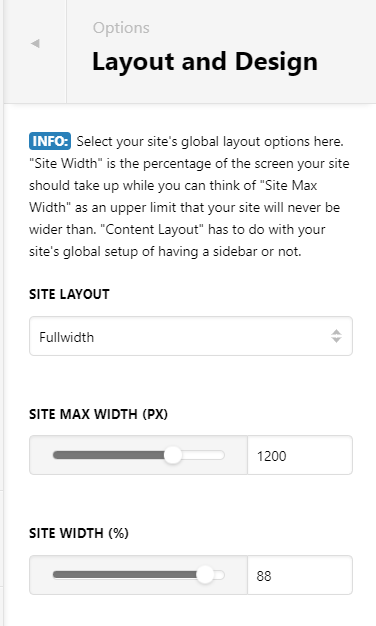
You can control it from Theme Options > Layout and Design: Adjust Site Max-width

On other pages where you want it fullwidth, please try to use NO - CONTAINER page template. This will make sure that your pages is not subject to the container settings on LAYOUT AND DESIGN. It will be fullwidth edge to edge.

Let say you adjust max-width to 1200px. Your post page will adjust like this: https://screencast-o-matic.com/watch/cYfU6mB6Gq
Did you add this CSS? Please remove it:

.entry-wrap {
    padding: 0px;
}

By default, using integrity stack, it is fullwidth. Can be adjusted using custom CSS that can be added on Theme Options > Global CSS

Here’s your guide on how to inspect correct elements:

See this sample:

Please use NO CONTAINER layout instead of LAYOUT FULLWIDTH.

Please check the guide on how to inspect elements. Then override current style by resettings shadows. Add the custom CSS on Theme Options > Global CSS

See this too: http://somup.com/cYfUXViEpY

That happens because your heading have 2 lines. You might want to implement min-height on your headings.
See this guide: https://www.w3schools.com/cssref/pr_dim_min-height.asp. Make sure to use correct selector.

Note that most of this is a guide. Actual customization is outside the scope of our support.

Thanks for this, helped a lot!

You’re welcome!
We’re glad @Lely were able to help you out.

This topic was automatically closed 10 days after the last reply. New replies are no longer allowed.