General Portfolio Questions

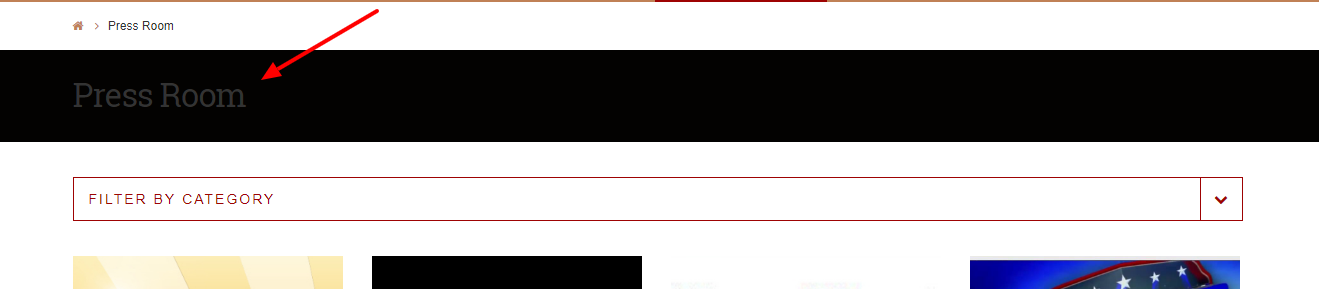
  1. There is a black title bar at the top. How may I change the text color? Right now it is dark grey on black & hard to read

  2. Is there an essential grid that creates the output that I may edit? Right now new portfolio (video) items do not have video showing on the cover, even though I have checked the “media” box (vs. thumbnail).

Otherwise, this is exactly what I was looking for in creating a press room without having to do the custom post types/metaboxes…whew!!

Thanks!

Hello There,

Thanks for posting in!

1.) You can change the colors for your site by going to X > Theme Options > {your stack}. I could not check your site because it is having some errors at the moment.

2.) When using Essential Grid, you can create your won skin or even edit the existing skin. Please check out this documentation: https://www.themepunch.com/essgrid-doc/item-skin-editor/

Hope this helps.

  1. My site is still under development

  2. I have a unique admin URL (secure note)

  3. I’ve set site colors and grid colors. I am referring to the text color on the black bar for the Portfolio (see picture)

Thanks!

Hello There,

Thanks for providing the information. The colors can be changes in X > Theme Options > Ethos and in X > Theme Options > Typography > Body and Content.

We would loved to know if this has work for you. Thank you.

It was under here…labeled “sidebar Widget” even though it’s a bar at the top of a page…

Thanks!

You’re welcome. Glad we could help.

This topic was automatically closed 10 days after the last reply. New replies are no longer allowed.