Gavity forms conditionals not working if they are inside a looper consumer

Hello,
I have a problem that I saw happened a few years ago.

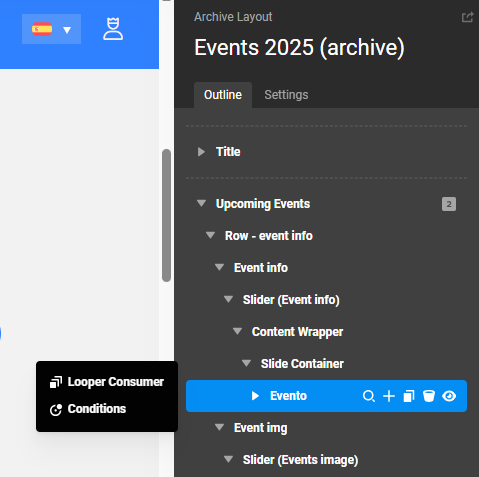
i have a looper consumer and inside it i have a form element with gravity forms and prefill fields.

The problem is that it seems the conditional is not working and as a result i can see both elements showing or the price of both “products” (which are handled by a conditional) are always added as an addition and not as an OR sum.

Now, could you check what’s going on and why is it happening? I have really no idea what to do here.

another thing is that if i go to the next slide and then click on the button again, it will be empty!

Hello @franticape,

Thanks for writing in!

There seems to be an @ sign in your condition.
@{{dc:post:meta key="wpcf-fecha-preventa1"}}

  • See the secure note below.

Kindly remove the invalid character and test the page again.

Best Regards.

I removed the character from both the conditions yet the problem remains :frowning:

  • the conditional in the form is broken (it shows only one element, but the sum is as if both were showing)
  • If I move the slider, the form doesn’t load.

I think it has to do with AJAX and the looper consumer (not the provider) because if i place the form outside the looper, it works better. the only problem with that is that it loads the form with just the first element of the looper and not the current one being viewed.

Hello @franticape,

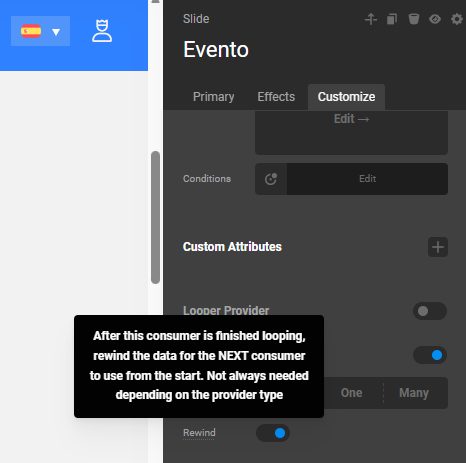
In your first Looper Consumer, enable the Rewind option.
image

image

It needs to be enabled so that the Looper Consumer on the right side goes through the returned items again.

Kindly let us know how it goes.

This didn’t solve any of the problems.

could you please test what you’re suggesting on the site? it’s ok, I have a site backup.

here’s a video showing the entire problem and where things are: https://www.loom.com/share/43a7bff5d732460aa3071f9be3404536

Hello @franticape,

Please keep in mind that you should NOT be using the same form over and over on the same page. You can check it here:

And also, Gravity Forms may not display properly on a modal form. Kindly check out this article documentation:

Hope this helps.

hello:

  1. the problem is not the modal because if i add it outside that consumer it works, it just shows the WRONG looper element but it does work

  2. What can i do to pass the dynamic content. like is thre a way to pass a variable inside the consumer and then use the variable outside the consumer?

the problem here is the consumer that for some reason is messing up with the conditional. that’s the main issue. he other issue with the form depends on how it’s rendered.

please let me know and please don’t tell me it’s a custom thing because it should not be anything “custom”, it’s dynamic content coming from loopers and consumers so it should be part of the support.

Hey @franticape,

I have created a demo page to show that the contents of the right slide that it coincides with the left slide. It will also check the field values that you are passing to the form. All I can see is that it returns the correct fields and items.

  • See the secure note below.

Thanks.

Hello,

I checked everything but i see everything blank, on each of the slides, what am I supposed to see? the form is not visible, nor can i see the values. can you please guide me?

oh sorry you mean the form on the left side. please note the TOTAL. note IT’S adding both elements even the ones being hidden and that’s not correct.

now add the same form with some static price. and note how that total works. you’ll see it will show the total based on the conditional and not add all up whether it’s in the conditional or not.

that is a problem linked to the consumer and cornerstone and NOT a bug in just gravity forms on its own. that’s what i’ve been trying to tell you all along.

so this is problem 1, let’s focus on that first, ok?

Hello @franticape,

You inserted the Gravity form “[gravityform id="1" title="true"]” inside the looper. As I pointed out, the Gravity Form should be used used mutiple time on the page because it will not display the 2nd and 3rd consumer items.

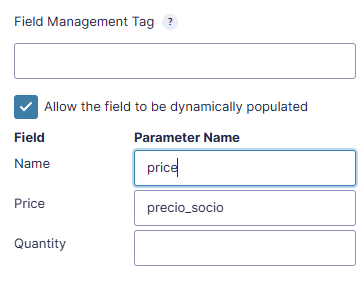
As for your Total price, both your Partner and nonpartner prices need to have the same parameter name:
image

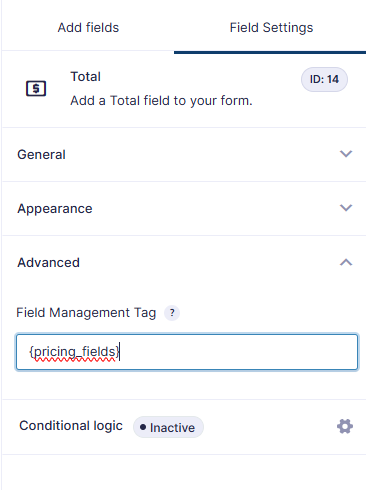
Then, in your Total field, you need to add the field management tag:
image

  • See the URL in the secure note below

Hope this makes sense.