Hello @franticape,
Question 1: How can I read the parameters from the Cornerstone Looper Consumer and add it to the Gravity Form?
You’re on the right track with the field_values parameter in the shortcode. However, there’s a critical limitation: Gravity Forms can only be rendered once per page. When you place the form inside a Looper Consumer, only the first instance will work—subsequent iterations won’t display the form at all.
The shortcode you’re using is technically correct for a single instance outside the looper:
php [gravityform id='1' title='true' field_values='precio_socio={{post.meta({"key":"wpcf-costo-socio-preventa"})}}&precio_nosocio={{post.meta({"key":"wpcf-costo-no-socio-preventa"})}}&faevent_name={{post.title({})}}']
But if you place this inside the Looper Consumer, it will not work for multiple items because Gravity Forms doesn’t support rendering the same form multiple times on a single page.
Question 2: If I need to add the Gravity Form outside the Looper Consumer, how can I get the parameters from the consumer?
Since Gravity Forms doesn’t support multiple instances inside a looper, your best option is to place the form outside the looper and pass the data via URL parameters.
Here’s how:
1.) Create a link inside your Looper Consumer that points to the page containing your Gravity Form, with the parameters appended to the URL:
html <a href="https://yoursite.com/form-page/?precio_socio={{post.meta({"key":"wpcf-costo-socio-preventa"})}}&precio_nosocio={{post.meta({"key":"wpcf-costo-no-socio-preventa"})}}&faevent_name={{post.title({})}}"> Request a Quote </a>
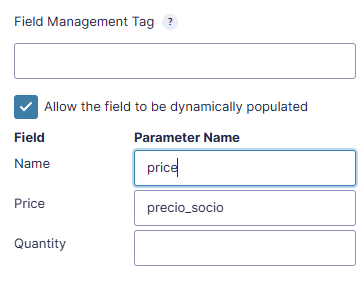
2.) Enable Dynamic Population in Gravity Forms for the fields you want to populate, using the same parameter names (precio_socio, precio_nosocio, faevent_name).
3.) When the user clicks the link, they’ll be taken to the form page with the data pre-filled.
Important Limitations:
-
Multiple forms on one page: Gravity Forms does not support rendering the same form multiple times. This is a limitation of the plugin itself, not Cornerstone.
-
Dynamic population via shortcode: The field_values parameter only works when the form is rendered on page load. It cannot be dynamically updated after the page loads.
-
No built-in “pass data to form” feature: Cornerstone does not have a native feature to pass looper data to a Gravity Form outside of URL parameters or the shortcode method.
Since the only reliable way to pass data from a looper to a form on the same page (without reloading) requires custom JavaScript, and we do not provide custom coding support, here are your options:
-
Use the URL parameter method (supported, no custom code needed) – The form must be on a separate page.
-
Use the shortcode outside the looper (supported, but only works for a single form instance).
-
Explore third-party plugins like Gravity Wiz that may offer solutions for passing data between forms and dynamic content.
-
Hire a developer for custom JavaScript/attribute implementation if you need the form on the same page.
If you’re not comfortable hiring an external developer, Theme.co offers a support service called ONE that may be able to help with this type of customization.