I am showing random gaps in between my items in my portfolio and blog main pages
Blog: https://www.iotacommunications.com/blog/
News: https://www.iotacommunications.com/news-and-events/
How can I remove this?
I am showing random gaps in between my items in my portfolio and blog main pages
Blog: https://www.iotacommunications.com/blog/
News: https://www.iotacommunications.com/news-and-events/
How can I remove this?
Hi Carly,
Thank you for writing in, I see there is a JS error on your site and it seems to be one on the Theme Options > JS. Please navigate to Theme Options > JS and remove (for awhile) all the custom JS there and see if that resolves the issue.
If removing JS in Theme Options did not work, please do a testing for a plugin conflict. You can do this by deactivating all third party plugins, and seeing if the problem remains. If it’s fixed, you’ll know a plugin caused the problem, and you can narrow down which one by reactivating them one at a time.
Let us know how it goes,
Cheers
Thank you. I deactivated the SMUSH plugin and that fixed it.
Can you answer this next question? I want to post a news item has a small expert that opens to a new window to a news article. I dont want a post page.
News: https://www.iotacommunications.com/news-and-events/
Thanks!!
Hi Carly,
Please add this code in X > Theme Options > JS:

(function($){
	var elements = $('.blog .full .post .entry-title a, .blog .full .post .entry-featured .entry-thumb, .blog .full .post .entry-wrap .read-more-link');
	elements.attr('target','_blank');

})(jQuery);
Kindly note that since this is a custom code that changes the default behavior/display of the theme, you will be responsible to maintain or update the code in case you require further changes or if the code stops working in future updates. If you are uncertain how to proceed, it would be best to get in touch with a developer.
Hope this helps.
will this do this just for one post? I still want the capability to have posts with pages. Thanks!
Hi Carly,
My apologies as I might have misunderstood your question.
The code above will make the links like the post title, featured image, and the read more link of the blog page open in a new window.
If you are asking for another thing, please provide us with more details so that we can provide some suggestions.
I would like the ability to 1) post a news item that is a link only with exerpt on main news page and pops to a new window and 2) a post that goes to a page and has content and images, etc.
Hi Carly,
Thank you for the clarification, while that is outside the scope of support, I could point you in the right direction with the understanding that it would ultimately be your responsibility to take it from here.
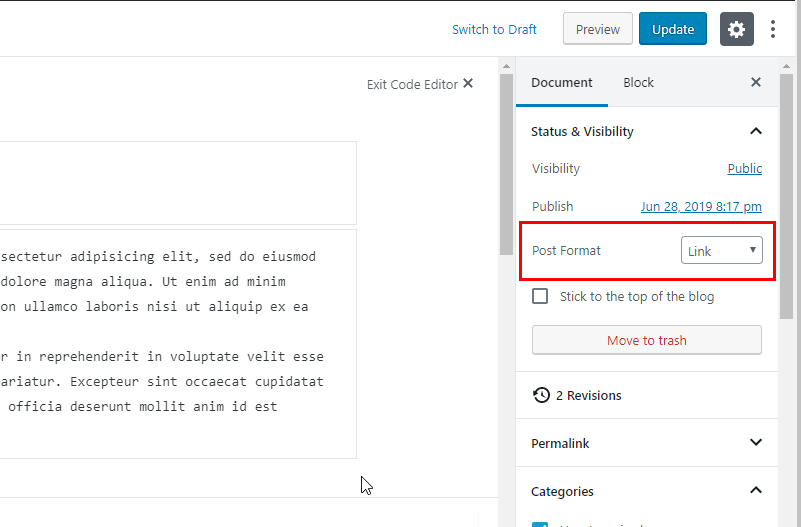
For the external link posts, you need to set that as a Link Post Format
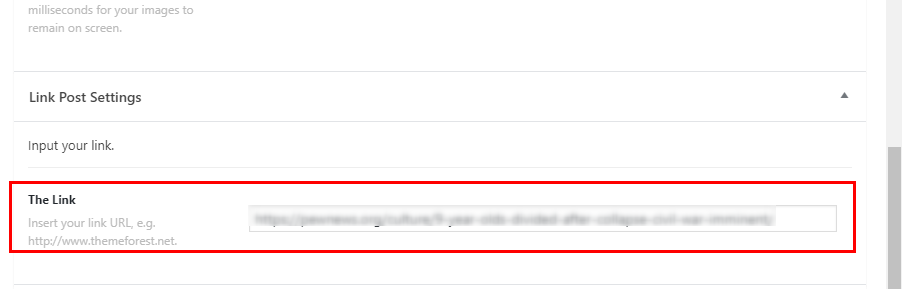
Then underneath the Post editor a Link Post Settings will show up, add your external link on that The Link input box.
Now to make that post open directly to the external link, follow the #2 guide provided here.
To add an excerpt on the post link follow the guide provided here.
Hope it helps,
Cheers,
This topic was automatically closed 10 days after the last reply. New replies are no longer allowed.
