hi guys can you please help me out get rid of this gap
as shown in the screenshot
i have two columns that I want to be even
here is the link for the page
http://yadtabenkin.org.il/test-essintial/

Hello Amir,
Thanks for asking. 
Please inspect the Section and Click on Remove Spacing button to remove the spacing.

Thanks.
thanks but i mean the gap between the columns
as shown in the screen shot

Hey There,
To remove that gap, please turn on the Marginless Columns option:
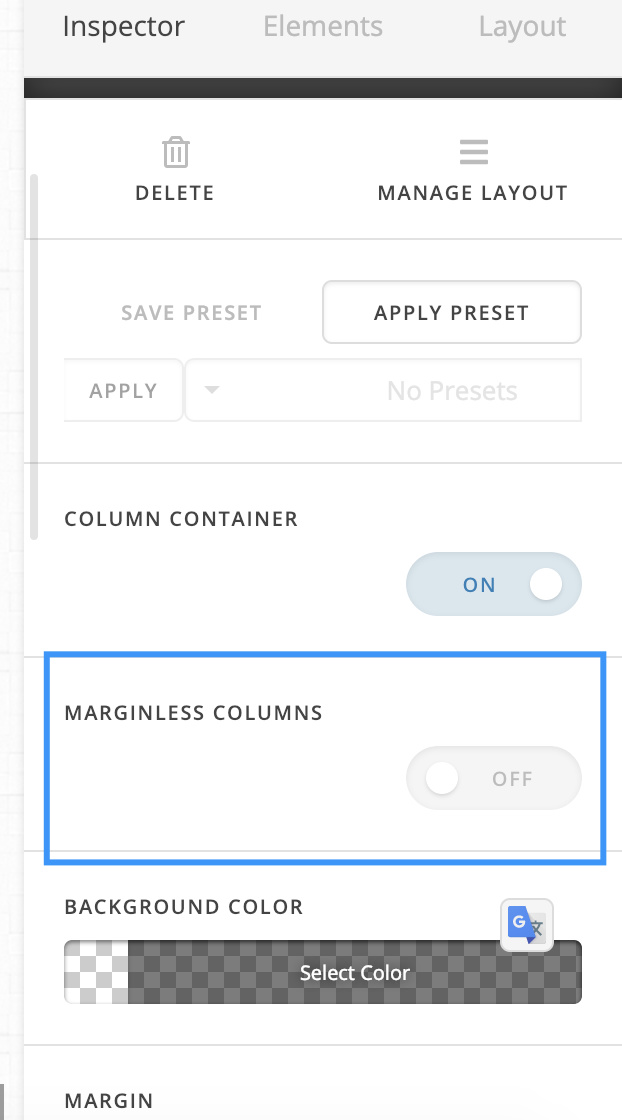

Hope it helps
never mind got it, thanks for the help
hi ignore the last question
i got it
Glad it’s okay now, cheers!
This topic was automatically closed 10 days after the last reply. New replies are no longer allowed.