Hi there,
there is this ugly gap between these two widgets, see screenshot. It’s a text widget and underneath a newsletter form. Would there be a way to remove it, or at least decrease it?
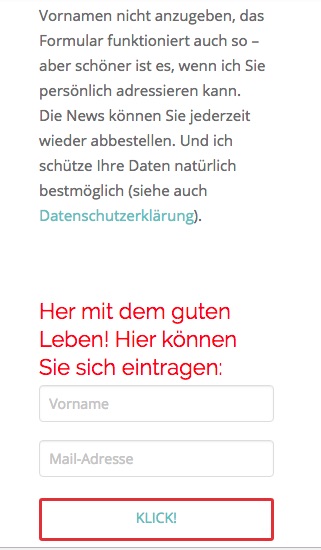
Thank you in advance,
Karen
Hi there,
there is this ugly gap between these two widgets, see screenshot. It’s a text widget and underneath a newsletter form. Would there be a way to remove it, or at least decrease it?
Thank you in advance,
Karen
Hello Karen,
Thanks for asking. 
I checked the URL’s that’s assigned in your licence manager but in both the URL’s I don’t see subscription box in footer. However, please add following CSS under X > Theme Options > CSS:
@media only screen and (max-width: 600px) {
    footer.x-colophon.top .widget {
    margin-top: .5em !important;
}
}
If you would like to learn CSS, I am sharing few resources that you take a look to get started with CSS and an interesting tool that you can use to speed up the development process.
I recommend you to watch following video that will help you to get started with CSS.
Sometimes it can get a bit difficult to find out the right selector to be able to write the required CSS codes. A handy tool that can help you in this is Google Chrome dev tools. I am sharing the resource that you can refer to get started with dev tools.
https://developers.google.com/web/tools/chrome-devtools/css/
Thanks.
Hi Prasant,
sorry I forgot to post the URL. It is here, my blog page:
The Email Form is the genuine one from X-theme, connected to Mailchimp. I installed it 2016, maybe it it out of date? I don’t mind building a new one.
And thanks for the CSS guide. I’ll dig into it as soon as all the GDPR stuff is through…
Cheers
Karen
Hi @x-vision,
Thanks for the URL, please add this CSS to your global custom CSS.
.x-sidebar .widget {
    margin-top: 0px;
}
I’m not sure if it’s a custom code due to CSS minification. So you may also remove it instead of adding new one.
Thanks!
Hi Rad,
thanks for writing. I don’t really understand what you are saying concerning minification - as far as I know that has to do with caching? - and removing code. But the code you added solved the problem, the gap is gone.
Would you suggest to remove some code?
Well, thank you anyway!
Cheers
Karen
This topic was automatically closed 10 days after the last reply. New replies are no longer allowed.