Gap between menu and banner

Hi, we have a site that uses background images as banners, some pages with breadcrumbs and some without, but there is always a gap at the top of the background image with or without the breadcrumbs. This happens on a desktop and a mobile. Is there a way to eliminate this gap?

Thanks

Hi Gabriel,

I checked the front end of your website and I found out that right before and after the start of the main content there is an empty P tag in the HTML code:
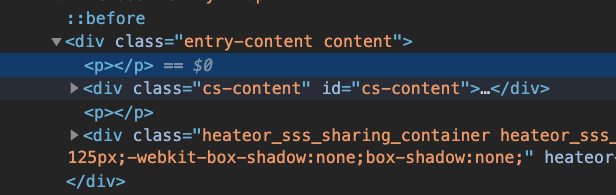
Screen Shot 2020-06-09 at 10.07.20

That is not part of our theme and it seems to be a problem caused by customization. And as the P tag has a default margin you see the gap in question.

The empty P tag is a side effect of having block-level elements such as DIV tag inside the P tag. Whatever you put inside a P tag should be inline-level such as SPAN.

I removed the P tag from my browser temporarily and saw that it fixed the issue:

That is why you need to check your customization and find a wrapping P tag and change it with DIV.

I see that you use a Child Theme and you might have the customization there. You can test by changing the theme from Child Theme to X and see the result.

Thank you.

Thanks, I can’t find what would be doing this though. If you use the language switch in the menu, you see the same page with the same elements in Japanese with no gap.

I have explored all elements on that page and there are no Paragraph tags used at all, much less enclosing Div tags.

I have no idea what is inserting the empty Paragraph tags.

The Child theme has minimal adjustment, switching to the standard theme does not fix the issue.

I also have the same empty Paragraph tags at the bottom of the page when I try to use a global block above the footer.

Hi Gabriel,

I can’t see the gap on my end, Is it happening to specific page? which one?


Try clearing your browser’s cache.

Thanks,

I have fixed the problem by adding the following to my Child-X theme functions.php which removes empty P tags.

remove_filter(‘the_content’, ‘wpautop’);

Glad you’ve sorted it out. That empty p tag is not from our theme, by the way. It could have been added by a 3rd party plugin or some other custom code.

This topic was automatically closed 10 days after the last reply. New replies are no longer allowed.