Fullwidth section in page

Hello,

I have this page: http://cervejavadia.pt/novosite2018/brewpub/
The page background is black.
Some sections have different color background (white, grey, etc…).
I wonder if t’s possible to make the sections fullwidth to hide completely the black on both sides.
The header is allready fullwidth!
Here’s an image of what talking about:

<img src="//tco-forum-uploads.s3.amazonaws.com/original/3X/a/0/a0438cf8be11aa2ed4e8510eb0be6b701810f266.jpg" width="116" height="500">

For your information, the page is fullwidth.
Thank you in advance.
Best regards,

      Nuno
Hey @nualexan,

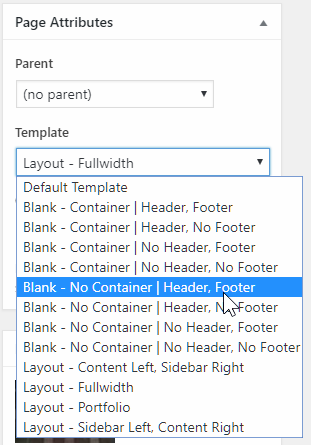
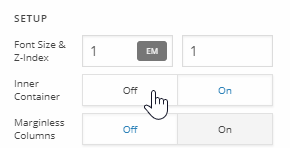
Yes, that is possible. You can use a Blank No Container page template. You’re currently using Fullwidth. Also disable your Row’s Inner Container.

Hope that helps.

1 Like

Thank you Christian.
It worked!
The only way to change Template is on the pages item in the backoffice, right?
There’s no way to change this directly on the PRO?
Best regards,

Nuno

Hi Nuno,

Yes, the only way to edit the Page Templates is to edit the code itself through a child theme.

Hope this helps.

This topic was automatically closed 10 days after the last reply. New replies are no longer allowed.