Full Width Rows/Columns

We are looking to get the look you can see in the photo here: https://www.dropbox.com/sh/yfbo7k9kjuqdi5v/AABDtECi0OKDx-FATdQIzPdfa?dl=0

Where the rows with 2 columns go all the way to the end of the page, where I could have a full photo on one side, and text on the other… that fills the page. My site is http://theglobalsportsman.com/new/. I am talking about on my home page at the bottom where you see the multi-colored boxes! I appreciate your help in this!

I have tried to remove padding, I have made sure it is blank, no container! Im sorry that I can’t figure this out!
Hello Patty,

Thanks for writing to us

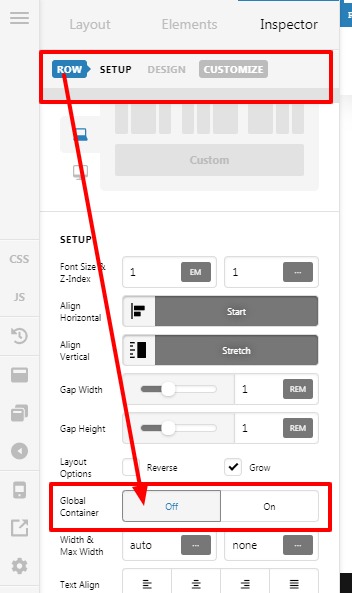
To make the Row fullwidth you need to go to your specific section—>Row and the set the Row’s Global Container as “OFF”

Please have a look the given screenshot below.

Thanks

1 Like

what if it already is marked “off”

I thought that was the fix but no luck!

Hello Patty,

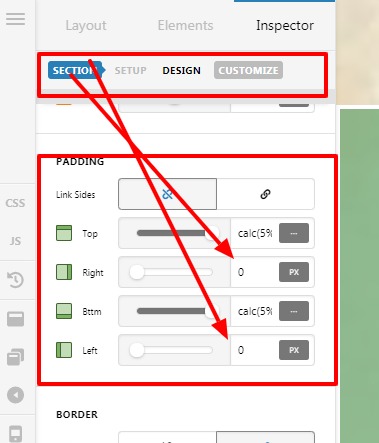
I checked your website Dashboard it seems that you have set a padding of the section, I have reset the padding-left and padding-right as 0.

Screenshot
Home-Content-Pro1

You had not set the Row’s Global Container as “OFF”
Screenshot
Home-Content-Pro

Now the frontend output

Thanks

This topic was automatically closed 10 days after the last reply. New replies are no longer allowed.