Full Screen Slider - Below Masthead

Have added my slider to be below the masthead on my home page. Changed it to full width in Slider Revolution and am still seeing margin on both left and right side when viewed at full width.

Reviewed other topics and not sure what I need to change to have it view full width on the screen.

Please help!
Hello Kimberly,

Thanks for writing in!

To resolve your issue, you will have to do the following:

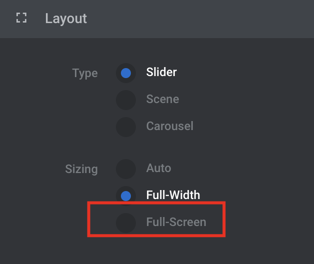
1.) Please edit your slider and set the slider layout to “Fullscreen”.
X0m1DBJ7SV_lBNgWS-bv8Q

2.) Remove the image layer in your slide.

3.) You should be adding it as a slide background image.
_BHezjSMT1WyaVd2oS8ujA

I went ahead and made the changes in #1 , #2 and the first slide.

Check your slider now.

Made the modifications you suggested. Unfortunately, the look is too big for the site. I don’t want it to exceed a height of more than 500px. When you put it full screen it ignores that.

Can you advise how I can force it to stay less than 500px regardless of what device it is viewed on?

Hello Kimberly,

I went ahead and edited your Slider Layout. I switched it back to just “Fullwidth”.

Check your homepage again.

This topic was automatically closed 10 days after the last reply. New replies are no longer allowed.