Hi,
I’ve created a grid which is in full height and it looks great on most viewports, but not on mobile in landscape.
Can I adjust the code, so the first section with the grid in is not in full height on landscape-mobile view?

Hi,
I’ve created a grid which is in full height and it looks great on most viewports, but not on mobile in landscape.
Can I adjust the code, so the first section with the grid in is not in full height on landscape-mobile view?
Hi Kobber,
A workaround that I can think about is to force a minimum height to that specific cell. Please kindly go to the Page Builder and select the Cell in question and click the Setup tab in the options and add a value into the Minimum Height option:
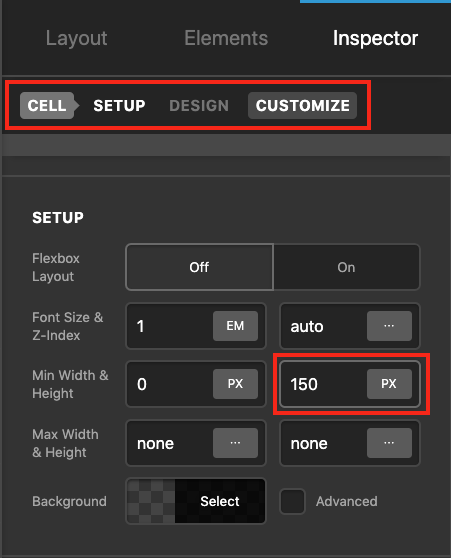
I’m not sure if 150px will do the trick but you can play with the values to find the best minimum height you can force for the cell to push the content of the white section and avoid making it too short which the content bleeds to the next cell.
Thank you.
This topic was automatically closed 10 days after the last reply. New replies are no longer allowed.
