Frustrating Bug In Pro Editor for Global Blocks

Hi

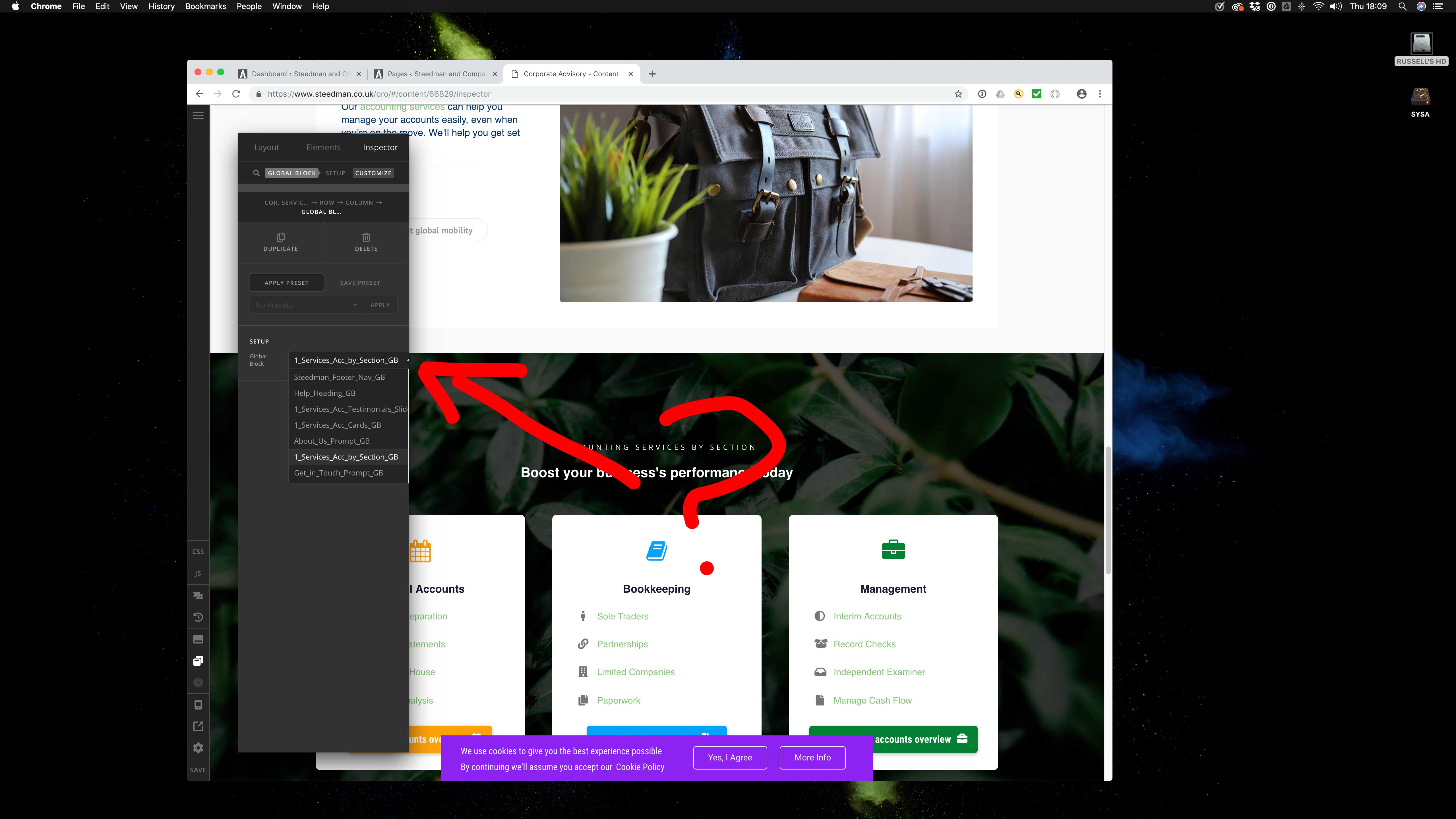
I’m trying to change Global Blocks in the editor but the box is too small and disallows the search function.

I can’t really use it properly as the scrolling is too fiddly and unreliable – is there a way to fix this?

See screenshot for exact issue and I’ll put login details in a secure note.

Thanks

R

UPDATE: Thinking it may be due to V2 elements clashing or something like that. I did have the site built in original X Theme / Cornerstone before then ‘upgraded’ it to Pro so that may have caused these type of issues in the editor?
Hi @russell3,

I logged on to your website and checked the global block element.
I found it working as expected. Only thing is the names are cut up as those are long.
The search and scroll are working just fine as expected.
Please check the video here.

Thanks

Ok thanks for checking. I managed to get the job done - possibly due to the browser or something like that. Thanks

Hello @Russell3,

You are most welcome!
If you need anything else we can help you with, don’t hesitate to open another thread.

Regards.

This topic was automatically closed 10 days after the last reply. New replies are no longer allowed.