Hello. My submenu looks like this:
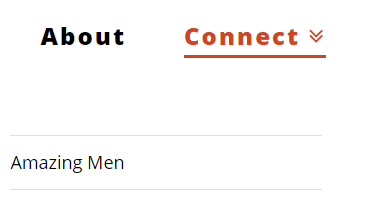
I want it to look more like this:
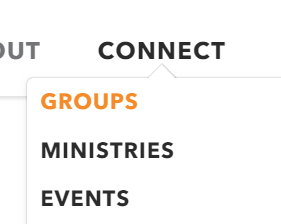
Same font, size, background, vertical, no down arrows next to the top level item, and a tab at the top would be a nice touch. How do I do that? Thanks.
Hello. My submenu looks like this:
I want it to look more like this:
Same font, size, background, vertical, no down arrows next to the top level item, and a tab at the top would be a nice touch. How do I do that? Thanks.
Hello @HGPower,
Thanks for asking. 
You can add following CSS under X > Theme Options > CSS:
.x-navbar .desktop .x-nav li>a>span:after{display: none;}

.masthead-inline .x-navbar .desktop .sub-menu:before {
    content: "\f077";
	margin:0 auto;
	font-family: "FontAwesome";
    display: block;
    text-align: center
}
Thanks.
Thanks for getting rid of the down arrows next to the main menu item. The code provided did not give me the overall results I was after. This is what it looks like after adding the css code:

This is more what I’m after:
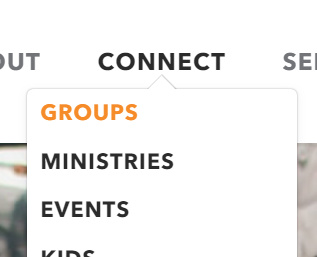
I would like the sub-menu:
the same font, size, background as the main menu and to show when you hover over it instead of clicking on the main menu item
no divider lines between menu items and no underline under the main menu item
vertically aligned directly under the parent item (not off to the left)
I was also hoping for a tab more like in the second image that is connected to the submenu background (not a font awesome icon sitting on top).
Hello There,
Thanks for writing in! Sorry if it did not work out for you. Please remove the code and update it using this code instead:
.x-navbar .desktop .x-nav li>a>span:after{
    display: none;
}

.masthead-inline .x-navbar .x-nav > .menu-item > .sub-menu {
	background: #fff;
	border: 1px solid #e5e5e5;
	box-shadow: none;
}
.masthead-inline .x-navbar .x-nav > .menu-item > .sub-menu:after,
.masthead-inline .x-navbar .x-nav > .menu-item > .sub-menu:before {
	bottom: 100%;
	right: 50%;
	border: solid transparent;
	content: " ";
	height: 0;
	width: 0;
	position: absolute;
	pointer-events: none;
}

.masthead-inline .x-navbar .x-nav > .menu-item > .sub-menu:after {
	border-color: rgba(229, 229, 229, 0);
	border-bottom-color: #fff;
	border-width: 20px;
	margin-left: -20px;
}

.masthead-inline .x-navbar .x-nav > .menu-item > .sub-menu:before {
	border-color: rgba(229, 229, 229, 0);
	border-bottom-color: #e5e5e5;
	border-width: 21px;
	margin-left: -21px;
}
Please understand that this code does not work perfectly. This is merely an example for you to get started with your customization of the menu. You can add more styling to it or even change the values like border thickness and colors.
Hope this helps.
This topic was automatically closed 10 days after the last reply. New replies are no longer allowed.