Formatting Category Post page

Hi there,

Quick question:

I have a post here:

http://www.budagastropest.com/2019/08/21/%d0%bd%d0%b5-%d1%81%d0%bb%d0%b8%d0%bf%d0%bd%d0%b5%d1%82%d1%81%d1%8f-%d1%8d%d0%ba%d1%81%d0%ba%d1%83%d1%80%d1%81%d0%b8%d1%8f-%d0%bf%d0%be-%d1%81%d0%bb%d0%b0%d0%b4%d0%ba%d0%b8%d0%bc-%d0%bc%d0%b5%d1%81/

Sorry for the URL, it’s Russian :D.

Here’s my question, I have 5 blog posts in a category named gasztroseta. I can see that Wp creates a class of .category-gasztroseta. Also, it’s only 5 posts, and they all have separate ID’s, so that might be a way to target them as well.

So here’s what I’m aiming to do:

.single .entry-wrap {
border: 1px solid black;
}

This however, targets ALL blog post pages, but I’d only like to target the ones that are in the gasztroseta class (or via post id if possible). However when I try to concatenate them, it doesnt work, I tried doing it with the post id as well, but that does not work either.

How would you go about achieving this?
Hi @Pbalazs89,

Thank you for writing in, your custom CSS code will work on a single post page, but not on archive pages (e.g. category page). To make that work on a category page, please update that to:

.single .entry-wrap,
.archive .entry-wrap {
	border: 1px solid black;
}

Hope it helps,
Cheers!

Hi,

Thanks for the suggestion, but that’s not exactly what I was aiming for.

I’d like to format Single Blog Post pages, with specific ID’s, or specific Categories. I’m guessing going the ID way is better, but I can’t figure out the right CSS.

Could you help with that?

Say, I’d like to format the blog post with the ID of 290, so single postid-290 for example.

Thanks!

Hi @Pbalazs89,

To target specific ID it should be:

.postid-290 .entry-wrap,
.postid-291 .entry-wrap,
.postid-292 .entry-wrap,
.postid-293 .entry-wrap,
.postid-294 .entry-wrap{
	border: 1px solid black;
}

Change other post ID.

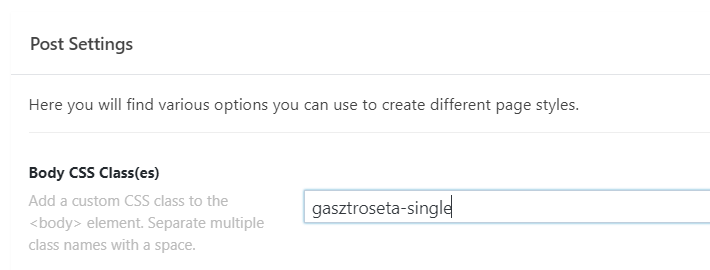
Alternatively, you can add custom class on each of those 5 POST SETTING like below:

Then the CSS can be like this:

.gasztroseta-single .entry-wrap{
	border: 1px solid black;
}

In case both of that CSS did not work, the issue is CSS syntax error. Make sure that there’s no missing or extra brackets.

Hope this helps.

This topic was automatically closed 10 days after the last reply. New replies are no longer allowed.