Hi, I have added a Custom Link to the Primary Menu on an X theme site. I would like to add a background colour to that one Menu item so it stands apart from the other items on the Menu. How might I achieve this?
Thanks
Hi there,
Please kindly go to appearance > menu and from the top of the screen click on the screen options. From there enable the CSS classes option.

Now for each menu item, you will have an option to add a CSS class. Just add a unique class there which will be used to style the specific link you’ve talked about:
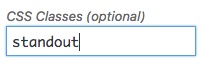
For example, I used the standout class. Now you can use custom CSS code to do changes on that specific menu item. You will need to add your CSS code to X > launch > options > CSS:
.standout {
   background-color: #ff00ff;
}
The CSS code above is just a sample code to show how you can do the changes. The specific CSS code which you will use for your customisation is something that you would do on your own.
Thank you.