Hi I need to make some changes to my site but I can’t find the sections to be able to do it.
1- I have to be able to set a Classic menu with the logo horizontally on the left and the rest of the menu on the right, just like on the website http://aramcapital.com/
2- The menu must be sticky
3- The space on the left side (http://exensya.com/aram/) must not exist, the pages must occupy the entire width of the page.
Thank you.
Hi Maria,
Thanks for reaching out!
1.) I am not able to understand your first question, would you mind sharing more information?
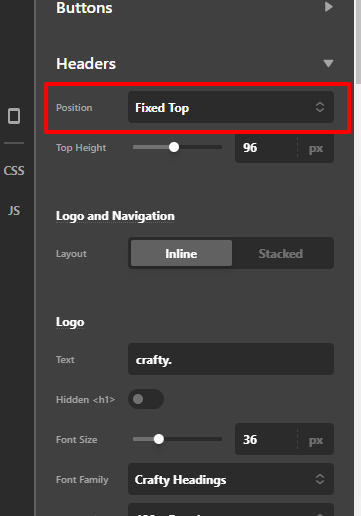
2.) To make the header bar sticky, just go to X > Theme Options > Headers then set the position to the fixed top.
3.) You have some custom CSS that why there’s a big space on the left side. I suggest that you remove that custom CSS.

Hope that helps.
Thank you.

How do i set the menu aligned on the right and the logo on the left?
As in the attached image.
now on the site in dev it is set incorrectly and I don’t know how to change it.
Hi Maria,
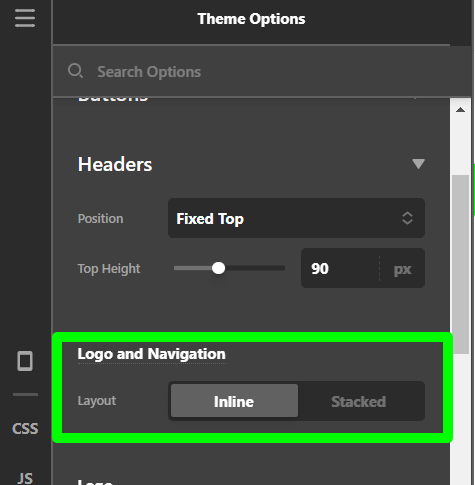
First of all, you need to set the Layout of Logo and Navigation to Inline from the Theme Options > Headers and then you need to add a custom CSS code into the Theme Options > CSS to reverse the order of the Menu and the Logo.
.x-brand.img
{
    float: right !important;
}
.masthead-inline .desktop .x-nav
{
    float: left !important;
}
Please remember that the above code will work if copied as it is and doesn’t conflict with any existing style.
Please note that the code provided serves only as a guide to help you get started custom coding on your own if there’s no option offered in our theme or the products we bundle.
We really do not provide support for custom codes that means we can’t fix it in case it conflicts with something on your site nor will we enhance it.
Thanks
This topic was automatically closed 10 days after the last reply. New replies are no longer allowed.