Hi -
Between the widgets, global footer, and the Menu footer, i cannot figure out how to easily change my footer content.
Hi -
Between the widgets, global footer, and the Menu footer, i cannot figure out how to easily change my footer content.
I had a developer create the site and now i can’t figure out why the footer menu at the bottom which I access through Appearance - Menus doesn’t work.
I also can’t seem to get the Theme Options menu to appear the way I want either.
Any reason I don’t just have one single footer control area?
Hello @srossand,
Thanks for reaching out. 
I see that the developer has added the contents via widgets in footer. You can edit the contents in footer from Appearance > Widgets and toggle Footer 1 and Footer 2. You can also access Theme Options panel from X > Theme Options.
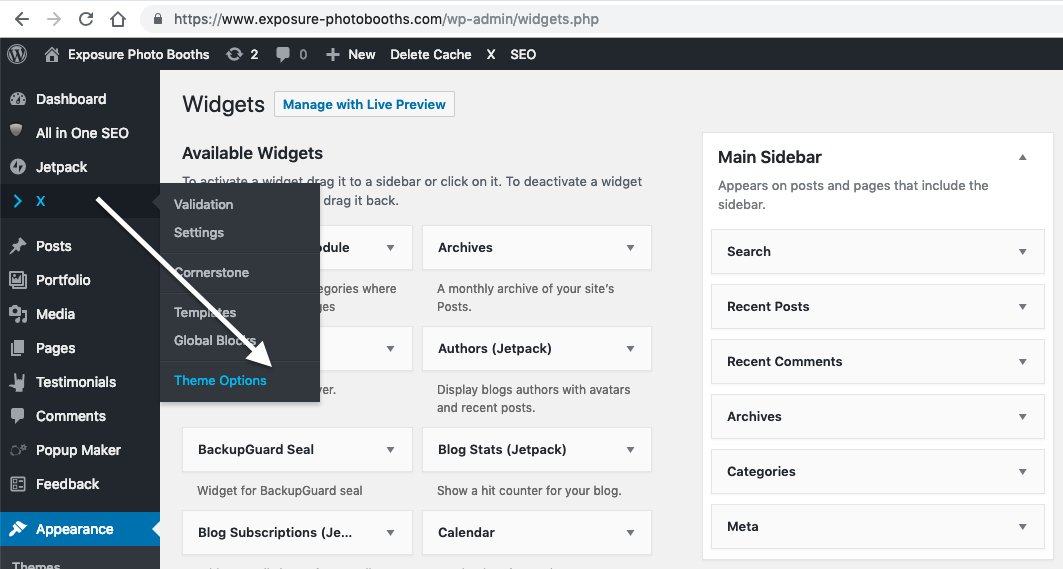
Thanks.
Hi Prasant
Neither Footer 1 nor Footer 2 actually tie out to what is shown in our footer.
The first one is one of our Active Campaign forms and the second is an Envira Gallery.
I need to change the menu at the bottom of our page in the Footer, instead.
Screenshots attached.


I need to only have one footer
I deleted the footer widget (which was not being displayed on the page anyway) and I disabled the X-Theme Options footer area as well, but there is still a footer being displayed. But it is not the one I have built under Appearance - Menus 
Appreciate the help cleaning up my mess, I’m super confused sorry ha
Hi @srossand,
Footer Content can be edited under Theme Options > Footer.

<br ./>
Now you deactivate both FOOTER WIDGET AREAS and BOTTOM FOOTER, right now your site has no footer.
Please clarify what element you’re referring as a footer, perhaps provide us a screenshot.
Thanks,
Thanks Prasant -
I have the footer I created in my menus displaying now from Appearance - Menus
Now, how do I get rid of this extra space at the bottom of the page between the last image area and the menu, please?
Hello @srossand,
Thanks for updating the thread.
You can add following CSS under X > Theme Options > CSS:
footer.x-colophon.top {
    display: none;
}
1- I have found the proper CSS code selector using the Chrome browser Developer Toolbar: https://www.youtube.com/watch?v=wcFnnxfA70g
2- For the CSS code itself, I suggest that you get started with this tutorial: https://www.youtube.com/watch?v=yfoY53QXEnI
Thanks.
This topic was automatically closed 10 days after the last reply. New replies are no longer allowed.