Footer social not showing

Hey

My social icons are not showing up in the footer. I’ve gone through the custom CSS, and there are nothing in there that will prevent the icons from showing up. www.blinkpr.co.nz

Also, on the GET IN TOUCH page, you’ll notice a massive empty area below the footer. I’m unable to remove this.

Thanks
Hi There,

Thank you for writing in, your site is under secure protocol (https://), you should have change these URLs, from http://www.blinkpr.co.nz to https://www.blinkpr.co.nz

But don’t change that manually under Settings > General. Follow the advice I provided here instead.

After you made this changes deactivate the Remove Query Strings plugin and “purge all caches” of W3 Total Cache.

Let us know how it goes,
Cheers!

Thanks for your fast response.

I have opened the homepage in Cornerstone and append https:// on the address, but nothing changed. Social media icons in footer still not there, and the huge white area below the footer area on the page GET IN TOUCH is still there. I have cleared the cache and removed query strings.

Any other suggestions?

Thank you

Hi There,

Sorry for the confusion, I’m not actually referring to that part, I’m referring to the Better Search Replace plugin part. You can download Better Search Replace here.

Then do that 2 steps below, but please, just to play safe keep a backup of your database first.

rewrite http://www.myurl.com -> https://www.myurl.com
rewrite http:\/\/www.myurl.com -> https:\/\/www.myurl.com

Thanks,

Hi

Thank you for the advice.

I’ve installed the plugin, but there is no input field “rewrite” It gives me the options for: SEARCH FOR and REPLACE WITH.

Do you wish me to place http://www.blinkpr.co.nz into SEARCH FOR field and https://www.blinkpr.co.nz into REPLACE WITH field?

Please clarify.

Thank you!

Hi There,

You are right you have to replace the old URL with new https
So search for the field would be http://www.blinkpr.co.nz and replace with the field would be https://www.blinkpr.co.nz.

also, you can search and replace this option too.

http:\/\/www.myurl.com  with  https:\/\/www.myurl.com

Hope this works.

Thanks. I’ve done this, but is still experience issues with social icons not showing in footer and massive white space below footer on GET IN TOUCH page.

Everything was fine until the theme update.

Please have a look.

Thanks

Hi There @BlinkPR

I have tried to login to your WordPress backend, but it seems that your login credentials are invalid.
ERROR: The username or password you entered is incorrect.

Could you please confirm with the correct information, so that we can check your issue. Also add your FTP credentials, so that we can check your child theme as well.

Thanks!

Sure, will send via secure note

Hi There,

Thanks for the details!

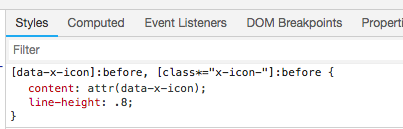
The icon issue is due to the custom CSS.

Not sure if you have added it intentionally, please remove it, it will fix the issue.

Regarding the space under the footer, that is due to the content you have on the page. Actually, the page having less content so the footer having space.

hope this helps!

Hi.

Thank you, this solved the issues.

Regards.

You’re welcome!
Thanks for letting us know that it has worked for you.

This topic was automatically closed 10 days after the last reply. New replies are no longer allowed.