Hi @tatyana_kozh,
Thank you for reaching out to us. This would require custom CSS as this is not a theme feature by default and is outside of our support scope, but we will do our best to help you getting started with the customization but we will not be able to implement it.
- To remove underscore of the text wherever it appears, add the following code in the Theme Options > CSS:
footer.x-colophon.top a {
    text-decoration: none;
}
- To center and reduce the line height, of the center column use this code:
footer.x-colophon.top .x-column.x-1-3:nth-child(2) {
    text-align: center;
    line-height: 1;
}
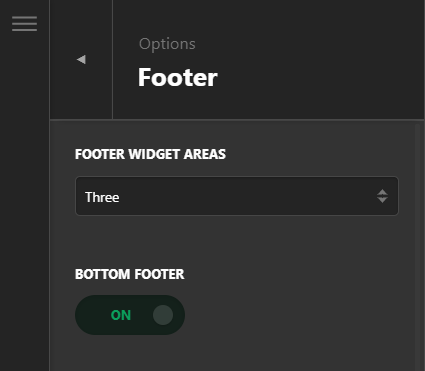
- For another footer layer, I’d suggest you to enable the bottom footer via Theme Options > Footer:
As you see it requires a lot of customization, You can customize the X footer’s basic settings via X > Theme Options > Footer however X footer was not designed for in-depth changes as we often receive footer related customization questions or requests and this was the reason why a header and footer builder was created and an advanced X version was formed now called Pro . If you need in-depth changes, please consider upgrading to Pro so you can build a custom footer yourself without custom coding. In case you upgrade to Pro and you get stuck with the options, we’re here to assist all the way. Please see https://theme.co/docs/header-footer-overview
Hope this helps!
