Hello Everyone,
I need the Footer to remind at the bottom of the page. Not in the center. Even with having little to no text on page (See Attached). Thanks in Advance!
Hello Everyone,
I need the Footer to remind at the bottom of the page. Not in the center. Even with having little to no text on page (See Attached). Thanks in Advance!
Hi @SydeL,
It happens because there’s not enough content to push the footer on the bottom. To avoid this, please add a minimum height on the section. Inspect the section, go to Customize Tab > Element CSS. Try adding the following:
$el.x-section{
  min-height: 100vh; /*Adjust 100 vh as needed*/
}

The following might also help:
Hello Lely
i am not finding Customize Tab > Element CSS
Hello @SydeL,
Thanks for updating the thread.
I have recorded a screencast that you can take a look at to navigate under Customize > Element CSS.
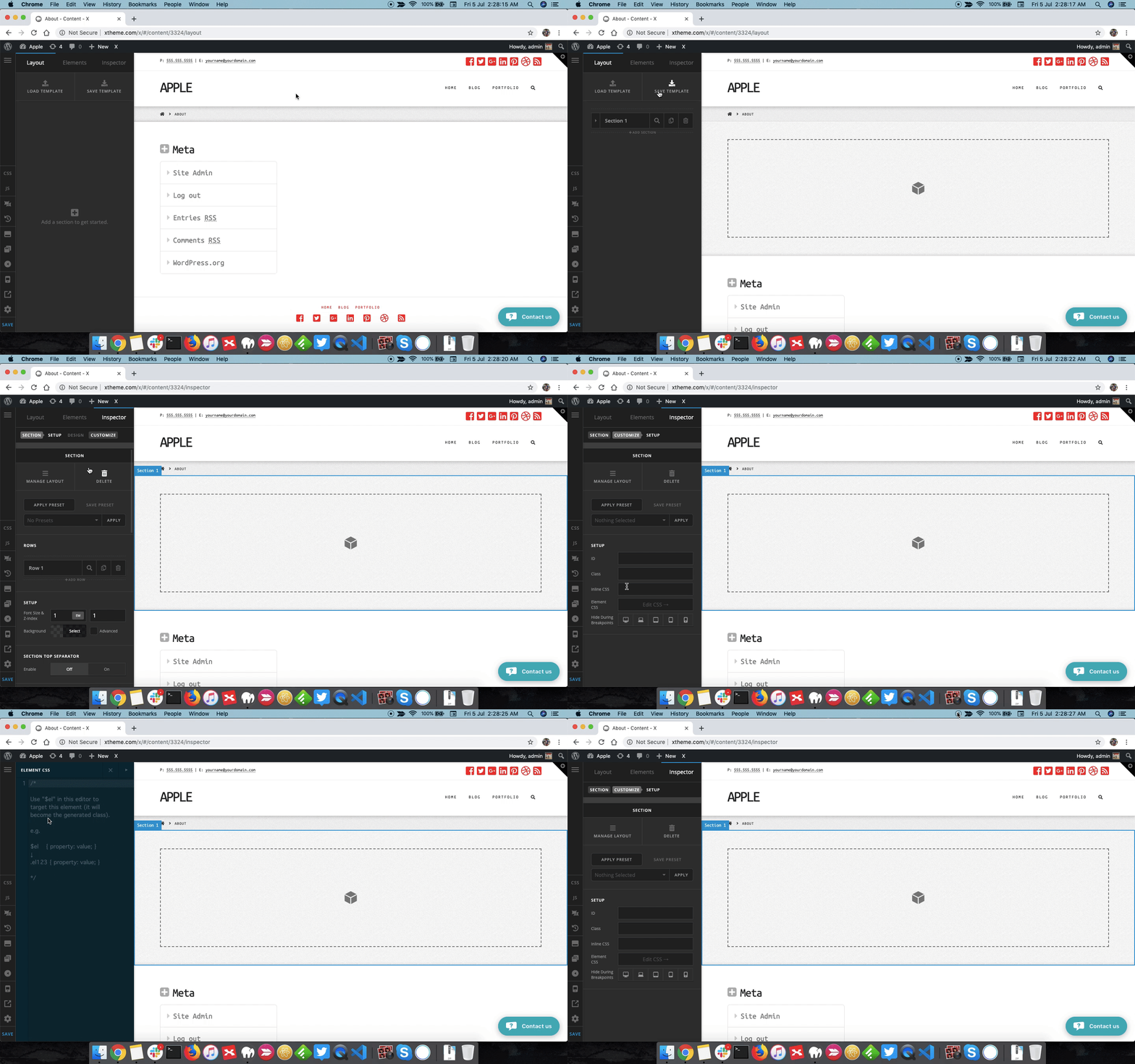
Thanks.
Hello Thanks for responding. But i didn’t use the Pro Page Builder to build the page. i Used WPbBakery page builder. Is there another way to fix the issue? Thanks!
Hello @SydeL,
I can see that you are using the default header and footer. To resolve your issue, please add the following CSS code in the X > Theme Options > Global CSS (http://prntscr.com/evui3r)
.page-template-template-blank-8 .x-main {
    min-height: calc(100vh - 98px);
}

.x-container.max.width.offset {
    min-height: calc(100vh - 439px);
}
We would love to know if this has worked for you. Thank you.
Hello RueNel,
Thanks alot! It worked perfectly.
We are delighted to assist you with this.
Cheers!
This topic was automatically closed 10 days after the last reply. New replies are no longer allowed.