Hello Samantha,
Thanks for writing in!
The footer area were partially covered behind the content section because of the -3em bottom margin you have added in the section settings. If you were trying to get rid of the space, please set the bottom padding to 0 instead.
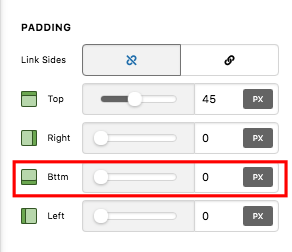
If you are not seeing the padding option in the section setting, most probably the Advanced Mode is disabled. You need to turn on the Advanced Mode by going to the Settings > Preferences > Advanced Mode


If nothing is helping, provide us access to your site so that we can check your settings and resolve it for you. Please create a secure note with the following info:
– Link to your site
– WordPress Admin username / password
To know how to create a secure note, please check this out: https://theme.co/apex/forum/t/how-to-get-support/288

Regards.

