Footer - Inline Navigation - Upward Direction

Hi Themeco,

Testing Pro 1.2.6

When adding Inline Navigation to a Footer Bar, if the bar is the last item on the page and therefore not enough space below any sub-links intelligently expand upwards in a vertical direction.

However, if there are multiple stacked Footer Bars underneath the Bar containing the Inline Navigation - because there is enough space the sub-links expand vertically downward. Is it possible to force sub-links to go upwards in a vertical direction for a specific Inline Navigation element?

Hello,

Please, could you provide your website link and the WP credentials? This way we can take a look better and check the best way to solve this.

Hi, I’ve added to the previous message - please define exactly what is required, I’m just testing stuff out.

Hi there,

Thank you for providing the information. Here is how I achieved the effect you want:

  • I went to Appearance > Menus
  • Selected the Footer Menu
  • From the top of the screen clicked on Screen Options and enabled the CSS Classes:
  • Added few sample menu items as a submenu of the blog menu item
  • Added the class of forcetop to the blog menu item.
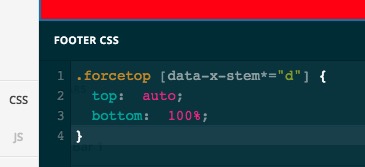
  • Went to Pro > Launch > Footer > CSS and added the CSS code below there:
.forcetop [data-x-stem*="d"] {
	top:  auto;
	bottom:  100%;
}

  • In the footer builder selected the Inline Navigation and assigned th eFooter Menu to it.

Now please check the result for the blog menu item in the footer.

Thank you.

Many thanks @christopher.amirian - I’ll give this a go :slight_smile:

You’re welcome, Have a great day :slight_smile:

Cheers!

This topic was automatically closed 10 days after the last reply. New replies are no longer allowed.