Hi, Can you please tell me how to change the footer font colour from grey to white ? Also is it possible to move the custom “Footer Content” text underneath the footer menu ? Thanks
Hi,
- To change it to white, you can add this in
Theme Options > CSS
.x-colophon.bottom {
    color:#fff;
}
- The footer content is already positioned at the bottom of Footer menu together with social icons just like in our demo.
http://demo.theme.co/integrity-1/
Can you provide us your site url and clarify where you want to move it.
Thanks
Hi, I’m afraid that CSS code didn’t change anything. Ref. the positioning I’d like the menu to be above the custom disclaimer text as you can see in my site below the custom text is currently above the menu. Thanks
Hi There,
To change the footer content and menu items to white color, please try adding this custom CSS instead:
.x-colophon.bottom .x-colophon-content,
.x-colophon.bottom .x-nav li a,
.x-colophon.bottom .x-nav li:after {
    color: #fff;
}
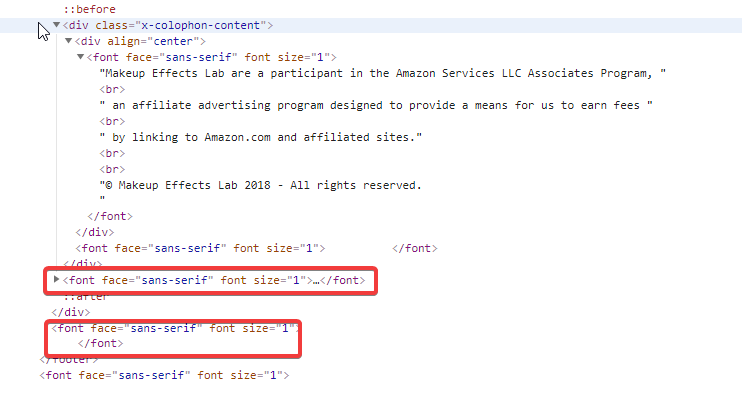
This issue happens because there is an unclosed </font> tag in your footer content. Could you please remove all the font tags inside your footer content?
Let us know how it goes!
Hi, Thanks, thats fixed the font colour issue. But the menu is still positioned below the custom text ?
Hey Simon,
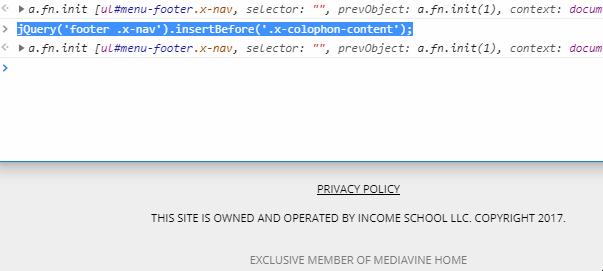
Please add this code in Theme Options > JS.
jQuery('footer .x-nav').insertBefore('.x-colophon-content');
To speed up our response time, would you mind posting the URL of your site the next time you open a thread?
Thanks.
That worked, many thanks.
You’re welcome.
This topic was automatically closed 10 days after the last reply. New replies are no longer allowed.